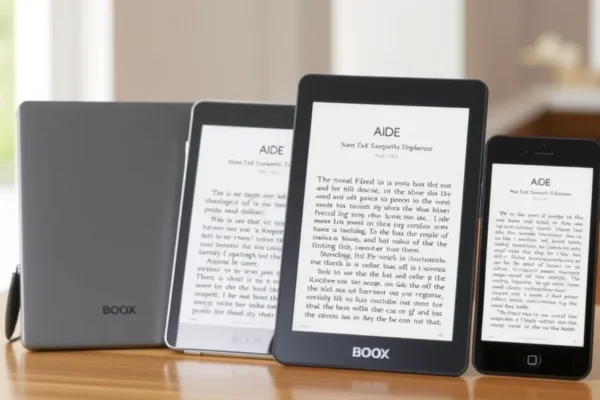
What Are the New Boox Devices All About
Onyx Boox has officially refreshed its lineup, and for anyone who loves the look of paper but needs the power of a tablet, these new releases are a big deal. The company has announced the boox palma 3, along with two new additions to their color digital notebook range: the note air6 c and the mini c.
In plain terms, these are e-paper devices. They use screens that look like a printed page rather than the bright, glossy glass of your phone or iPad. This makes them significantly easier on your eyes during long reading sessions. The boox e-reader and color digital notebook line is designed for people who want to bridge the gap between a classic e-reader and a fully functional Android tablet. Whether you are a student, a professional managing workflows, or someone who just hates eye strain, these gadgets are designed to keep you focused without the endless distractions of a smartphone.
Daily Life With a Digital Notebook
So, how do these actually fit into your routine? Think of these as a replacement for the stacks of loose-leaf paper and notebooks cluttering your desk. The note air6 c and mini c are specifically geared toward note-takers. If you are a project manager, you might use the color display to highlight tasks in different colors while sketching out project roadmaps during a meeting. It feels like writing on a notepad, but you never run out of pages.
If you travel frequently, the boox palma 3 is a game changer. It is designed to be pocket-sized, fitting comfortably in a jacket pocket or small purse. You can take your entire library of books, news articles, and PDFs on the go. Because it uses e-ink technology, you can read comfortably under the bright sun at the beach or in a dim airport lounge, and the battery will last for days, not hours.
Who Should Consider These Devices
These devices are not for everyone, so it helps to be honest about your needs. They are best for people who value focus and eye comfort above all else. If you are an academic or someone who reads a lot of technical documents, you will love the ability to mark up files directly. They are also great for people who want a digital planner that doesn’t constantly ping with notifications.
You should skip these if you need a high-speed device for gaming or streaming video. While these tablets run apps, the screen refresh rate is much slower than a phone, making them poor choices for anything that requires smooth motion. If you just want a cheap tablet for Netflix, stick to an inexpensive standard Android tablet or an iPad.
Boox Versus The Competition
In the world of e-ink, your main alternatives are the Kindle series or the Kobo lineup. The primary difference here is flexibility. Kindles are essentially closed ecosystems; they want you to buy your books from Amazon. The boox e-reader lineup is essentially an open Android tablet, meaning you can install apps like Libby, Notion, or your preferred news reader.
While the boox models are more expensive than a basic Kindle, you are paying for the freedom to install almost any app you want and the ability to use a stylus for detailed note-taking. If you want a simple, “it just works” experience for reading paperbacks, a Kindle is better value. If you want a multifunctional tool for productivity and reading, the extra cost of a Boox device is well-justified.
Getting Started and The Learning Curve
Setting these up is similar to setting up any Android phone. You will connect to Wi-Fi, sign into your Google account, and download the apps you use most. However, because these devices have unique screens, there is a bit of a learning curve regarding settings. You will need to learn how to adjust the “refresh modes” to balance clarity with speed, especially when using third-party apps.
It is not rocket science, but it is not as intuitive as a standard tablet. Expect to spend the first hour or two tweaking settings to find the look that feels right for you. Once you dial in your preferences, the experience becomes very fluid.
Real World Pros of the New Boox Models
- Eye Comfort: The e-ink display is significantly more pleasant for long-term reading compared to backlit LCD screens.
- App Ecosystem: Unlike restrictive e-readers, these allow you to install almost any Android app from the Google Play Store.
- Build Quality: Users generally report that the hardware feels sturdy and professional, with a tactile feel that mimics real paper.
- Versatile Note-Taking: The color e-notebook features allow for creative workflows, color-coding, and detailed brainstorming that monochrome e-readers cannot touch.
Real World Cons and Limitations
- Refresh Speed: Because of the nature of e-ink, you will see a “ghosting” effect or a slight stutter when scrolling through web pages or social media.
- Not for Media: Watching video or looking at high-resolution photography is not a great experience on these devices.
- Battery Management: While better than a phone, battery life can drain quickly if you keep Wi-Fi on constantly or run heavy third-party apps.
Price and Value Proposition
As of late 2024, these devices carry a premium price tag compared to single-purpose e-readers. You are paying for a niche technology that combines a tablet processor with an e-paper display. For the professional who plans to use it for digital planning, reading, and document management, the investment is usually worth it over the long term. However, for the casual reader, the high cost of entry may be hard to justify. There are no hidden subscription fees, but you may want to budget for a protective case or a higher-quality stylus tip replacements if you write heavily.
Final Verdict
The boox palma 3 is a fantastic pocket companion for readers who want to digitize their library without losing the portability of a paperback. The note air6 c and mini c are impressive color digital notebooks for students and creatives who need a focused workspace. If you need a device to stop your digital distraction, improve your reading habits, and keep your notes organized, these are excellent tools. If you are looking for a general-purpose entertainment tablet, save your money and look elsewhere.
Common Questions and Answers
Is the boox palma 3 worth the price for a casual reader?
If you read daily and value portability, it is a great investment. However, if you only read occasionally, a standard, cheaper e-reader will serve your needs just as well.
Do I need special accessories for the note air6 c?
It comes with a stylus, but many users find that buying a screen protector or a custom magnetic case improves the feel and adds necessary protection for a high-end device.
How long does the battery last on these new models?
In real-world testing, these devices generally last several days with moderate use. If you leave the Wi-Fi on or use the backlight at maximum brightness, expect to charge it more frequently.
Can I read books from libraries on these devices?
Yes. Because they run Android, you can easily install the Libby app or any other library app to borrow ebooks and audiobooks just like you would on a phone.
Is there a learning curve for the color screen?
The color display is subtle and not as vibrant as a phone screen. It takes a moment to get used to the muted tones, but it is perfect for highlighting and annotating documents.
Product prices and availability vary by region. Verify current pricing before purchase.