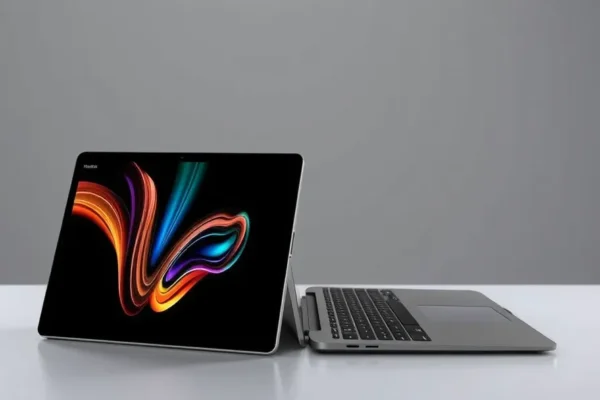
The Gadgets That Do It All: Your Guide to the Best 2-in-1 Laptops in 2026
Ever feel like you’re juggling too many devices? A laptop for work, a tablet for chilling on the couch, and maybe even a separate stylus for jotting down notes? If that sounds familiar, then the world of 2-in-1 laptops might be exactly what you need. These clever gadgets combine the power of a traditional laptop with the portability and touch-friendly interface of a tablet, all in one package. They’re designed for anyone who craves flexibility, whether you’re a student rushing between classes, a remote worker on the go, or a creative mind that likes to sketch out ideas wherever inspiration strikes. In 2026, these hybrid laptops are more capable and refined than ever, offering a seamless experience that can genuinely simplify your digital life.
From Keyboard to Canvas: How 2-in-1 Laptops Work in the Real World
Imagine this: You’re on a train, typing up a report for work. Your laptop is in its standard laptop position. Suddenly, you get an idea for a quick sketch to go with your report. With a flick of the hinge, your laptop transforms into a tablet. You flip the screen around, maybe attach a stylus (sold separately, of course!), and draw your idea directly onto the screen. Later, you’re on the couch, wanting to watch a movie. You can prop the screen up like a kickstand, or detach the keyboard entirely if the model allows, to get that perfect viewing angle. It’s like having a smart, adaptable companion that shifts to fit your needs.
Here are a few real-world scenarios:
- The Frequent Flyer: You need a machine that can handle emails and presentations on the plane, but also be light enough to carry in your backpack. When you land, you can use it in tablet mode to quickly browse travel guides or watch movies without needing to prop up a keyboard.
- The Creative Student: You’re attending lectures, taking notes with a keyboard. For art class, you can fold it into tablet mode and use a stylus to sketch your designs. Later, you can unfold it back into laptop mode to type up your essays.
- The Home Manager: You use it as your main computer for paying bills and managing family schedules. When it’s time to unwind, you can detach the screen to read an e-book in bed or let the kids play an educational game on the touchscreen.
Who Should Be Eyeing Up a 2-in-1?
These versatile machines aren’t for everyone, but if you fit into these categories, you’ll likely love them:
- Best For: The Versatile Professional or Student. If your work or studies demand both traditional typing and more intuitive touch or stylus interaction, a 2-in-1 is a game-changer. Think designers, architects, note-takers, and anyone who moves between different tasks frequently.
- Good For: Travelers and Commuters. The ability to switch between modes makes them perfect for portable use, whether you’re on a plane, train, or just moving around the house.
- Skip If: You Rarely Need Tablet Functionality or Prioritize Raw Power. If you primarily use your device for heavy-duty tasks like video editing or gaming and never touch the screen, a traditional clamshell laptop might offer more power for your money. Also, if you already own a separate, excellent tablet, the 2-in-1 aspect might be redundant.
How Do They Stack Up? Your Top Contenders
The 2-in-1 market is heating up, with some familiar faces leading the charge. We’re looking at the big players: Microsoft’s Surface devices, Lenovo’s Yoga line, and even Apple’s iPad Pro with its Magic Keyboard.
- Microsoft Surface Pro/Laptop Studio: Microsoft is practically synonymous with 2-in-1s. Their Surface devices often feel like a premium tablet first, with a detachable keyboard cover that snaps on magnetically. The Laptop Studio takes a different approach, with a screen that slides out and over to create different modes. They’re known for excellent build quality and integration with Windows.
- Lenovo Yoga Series: Lenovo’s Yoga line offers a wide range of convertible laptops. Many feature a 360-degree hinge, allowing you to fold them completely flat into tablet mode, use them in “tent” mode for presentations, or stand mode for watching videos. They often strike a good balance between features and price.
- Apple iPad Pro with Magic Keyboard: While technically an iPad, the iPad Pro combined with Apple’s Magic Keyboard becomes a very capable 2-in-1 experience. It offers a stunning display and powerful performance for creative tasks, and the keyboard transforms it into a usable laptop for many everyday tasks. However, its software (iPadOS) is still more app-centric than a full desktop OS.
Getting Started: Setup, Use, and the Learning Curve
One of the beauty of modern 2-in-1s is their ease of use. Most are designed to be incredibly straightforward.
- Setup: For Windows machines like Surfaces and Yogas, it’s much like setting up any new laptop – connect to Wi-Fi, sign in with your Microsoft account, and let it run through its updates. The detachable keyboard covers or folding hinges are usually intuitive. For the iPad Pro, it’s the familiar iOS/iPadOS setup.
- Learning Curve: The biggest “learning curve” is simply remembering to switch modes! The hinge mechanisms are generally smooth and don’t require force. If you’re new to touchscreens on a laptop, it might take a day or two to get used to finger gestures instead of just a mouse. For the iPad Pro, the main learning curve is understanding the difference between iPadOS apps and a traditional desktop operating system.
- Frustrations: Sometimes, with very thin detachable keyboards, typing for extended periods can feel a bit cramped compared to a full-sized laptop. Also, ensuring you have the right software or apps that take full advantage of the touchscreen and stylus can be a minor hurdle.
The Real Perks: What You’ll Actually Love
Let’s talk about the good stuff you’ll experience daily:
- Unmatched Versatility: This is the headline feature. Being able to switch from typing a document to sketching an idea or watching a movie without changing devices is incredibly convenient. It truly adapts to your workflow.
- Portability and Lightness: Many 2-in-1s are designed to be thin and light, making them easy to carry around. This is a huge plus for anyone who doesn’t want to lug a heavy laptop.
- Intuitive Touch and Stylus Input: For creative tasks, brainstorming, or even just navigating menus, the touchscreen and stylus (if supported and purchased) offer a natural and direct way to interact with your device. Many users report feeling more engaged with their work when they can draw or annotate directly.
- Sleek, Modern Designs: Manufacturers have really focused on making these devices look good. Premium materials and innovative hinge designs make them feel like high-tech tools, not just basic computers.
- Improved Battery Life for Everyday Tasks: While demanding tasks will drain them, for general web browsing, document editing, and media consumption, many 2-in-1s offer excellent battery life, easily lasting a full workday.
The Not-So-Great: Potential Downsides to Consider
No gadget is perfect, and 2-in-1s have a few trade-offs:
- Potential for Less Raw Power at the Same Price: Compared to a traditional laptop of the same price, a 2-in-1 might sometimes have slightly less powerful processors or graphics cards because engineering them to be thin and have a flexible hinge is complex.
- Keyboard and Trackpad Compromises: For models with detachable keyboards or very thin designs, the typing experience might not be as comfortable as a dedicated, thicker laptop keyboard for very long writing sessions. Trackpads can also sometimes feel smaller.
- Durability Concerns with Hinges: While manufacturers have improved significantly, complex moving parts like hinges can, in theory, be a point of failure over time, especially if the device is roughly handled. User reports suggest this is rare but worth noting for heavy use.
- App Optimization Can Vary: While Windows and macOS are mature desktop operating systems, not all apps are perfectly optimized for touchscreen or stylus use. This is less of an issue with the iPad Pro, but some desktop software might feel a bit clunky with touch input.
Is It Worth the Dough? Price, Value, and What to Expect
2-in-1 laptops span a wide price range, from budget-friendly options to premium powerhouses.
- Price of Entry: You can find decent 2-in-1s starting around $600-$800, but for a truly premium experience with excellent performance and build quality, expect to spend between $1000 and $2000. The Apple iPad Pro with its Magic Keyboard will push you well into the $1500+ range.
- Value Proposition: For users who genuinely need the flexibility of both a laptop and a tablet, a good 2-in-1 offers excellent value by consolidating two devices into one. If you’d otherwise buy a separate tablet and laptop, the cost might even be similar, with the added benefit of seamless integration.
- Hidden Costs: Be mindful that high-quality styluses and premium keyboard attachments are often sold separately. Factor these into your budget if they are essential for your intended use.
- Budget Alternatives: If the price of top-tier 2-in-1s is too steep, look at more budget-friendly Lenovo Yoga models or some of the more affordable HP Spectre x360 or Dell Inspiron 2-in-1 options. These might offer slightly less premium materials or older processors but still provide the core 2-in-1 functionality.
The Final Word: Who Should Rush Out and Buy One?
The best 2-in-1 laptop for 2026 is a fantastic tool for anyone who values flexibility and wants to streamline their digital life.
- You Should Buy This If: You’re a student, creative professional, or a mobile worker who needs to switch between typing, drawing, presenting, and media consumption seamlessly. If you’re tired of carrying multiple devices and want one machine to do it all with style and efficiency, a 2-in-1 is an excellent choice.
- You Should Wait or Look Elsewhere If: Your primary need is raw computing power for demanding tasks like high-end gaming or professional video editing, and you never plan to use the touch features. In that case, a dedicated, powerful traditional laptop will serve you better and potentially be more cost-effective.
Ultimately, a 2-in-1 laptop is about adapting to your needs. It’s an investment in convenience and a more fluid way of working and playing.
Got Questions? We’ve Got Answers.
Is a 2-in-1 laptop worth the price compared to a regular laptop?
Yes, if you genuinely need both laptop and tablet functionality. It consolidates two devices, offering versatility that a standard laptop can’t match.
How long does a 2-in-1 laptop’s battery typically last?
For everyday use like web browsing and document editing, expect anywhere from 8 to 12 hours. Heavy use will reduce this significantly.
Can I use a stylus with all 2-in-1 laptops?
Not all. Some models are designed specifically for stylus input (like many Microsoft Surfaces), while others have touchscreens but don’t always include or support active styluses. Always check the product specifications.
Are 2-in-1 laptops durable?
They are generally well-built, but the hinges are moving parts. Treat them with reasonable care, and they should last. User reviews suggest they hold up well for daily use.
Do I need to buy accessories for a 2-in-1 laptop?
Often, the keyboard is included or a magnetic attachment. However, a stylus is usually a separate purchase and highly recommended if you plan to do a lot of drawing or note-taking.
What’s the difference between a convertible and a detachable 2-in-1?
Convertibles have hinges that let you fold the screen 360 degrees (like Lenovo Yoga). Detachables have a screen that fully separates from the keyboard (like many Microsoft Surface models).
Product prices and availability vary by region. Verify current pricing before purchase