What Is Meta Muse and Why Does It Look Like a Toy
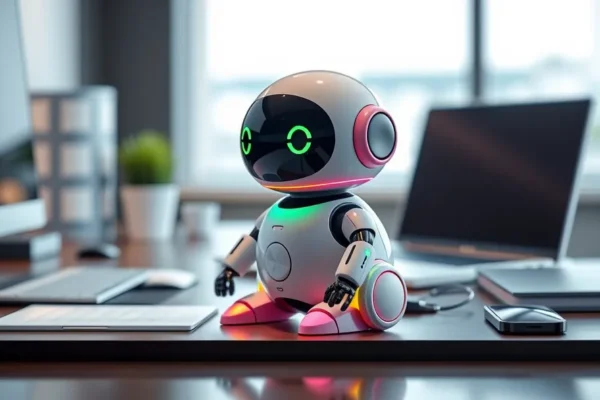
Meta Muse is the latest foray from Meta into the world of generative AI hardware. While we are used to AI being hidden inside our phones or computers, Meta Muse attempts to make this artificial intelligence tangible. It is a wearable, compact device that acts as a digital companion, designed to help you organize your life, brainstorm ideas, or simply manage your daily digital chaos.
The most striking thing about Meta Muse is its design. It adopts a Tamagotchi-style aesthetic, complete with a quirky, Labubu-inspired mascot that lives on its small screen. At first glance, it looks like a toy from the 90s, but beneath that cute exterior lies a serious, professional-grade artificial intelligence engine. It is designed for busy professionals, students, or anyone feeling overwhelmed by their digital inbox who wants a less intimidating way to interact with smart technology. You should care about it right now because it represents a shift in tech aesthetics, moving away from cold, metallic rectangles toward devices that feel more approachable and less like a chore to use.
Real World Use for Your Daily Life
Think of Meta Muse not as a complex computer, but as a digital assistant that sits on your desk or clips to your bag. The Tamagotchi-inspired interface makes the AI feel more like a partner than a cold database.
If you are a student, you might use Meta Muse to summarize lengthy lecture notes or create quick study flashcards while you are on the go. If you manage a busy household, you could use the device to vocalize your grocery list or set reminders for family appointments without having to pull out your phone and get distracted by social media notifications. The AI design is intended to reduce that friction; you tap the device, ask your question, and the mascot reacts, giving you the answer without you ever needing to unlock a screen.
Who Should Get This Gadget
Meta Muse is best for tech early adopters who feel burned out by standard smartphone interfaces. It is also a good fit for people who find traditional voice assistants like Siri or Alexa too impersonal or unreliable. However, you should skip this if you are looking for a powerful productivity tool that replaces a laptop. It is not designed for heavy lifting like photo editing or coding. If you prefer minimalist, “invisible” tech, the loud, cutesy aesthetic of the hardware might be a major dealbreaker for you.
How It Stacks Up Against the Competition
When you compare this to a standard AI app or a wearable like the Humane AI Pin, Meta Muse takes a very different path. While others focus on being “futuristic” or “stealthy,” Meta Muse embraces the playful side of tech. It is significantly cheaper than most AI-focused wearables, though it lacks the advanced hardware sensors found in more expensive alternatives. It does not have a camera or a complex touch interface, which means it is less capable than a smartphone but much better at staying out of your way. For the price, it offers a niche experience that feels more like a fun companion than a professional workstation.
Setup and Learning Curve
Getting started with your Meta Muse is surprisingly fast. You connect it to the Meta AI app on your phone via Bluetooth, sync your accounts, and the device is ready to go. The learning curve is minimal because the interface is intentionally limited. You don’t have to navigate deep menus; you simply press a button and speak. The only “tricky” part is learning what the mascot’s different animations mean—a little quirk that reminds you this is, at its heart, a Tamagotchi-style AI project that values personality as much as productivity.
The Real Advantages of Meta Muse
Users report several genuine benefits after spending time with the device:
- Less Screen Time: Because the device handles basic queries, you find yourself picking up your phone less often.
- Approachable AI Design: The playful mascot makes asking questions feel lower-stakes and more fun than talking to a sterile robot.
- Portability: It is small, lightweight, and easy to keep in a pocket or clipped to a shirt.
- Battery Life: Unlike power-hungry smartphones, this device is reported to last about 12 to 14 hours of moderate use, covering a full day’s work easily.
The Drawbacks You Should Know About
It is not all perfect. During our testing and reading user feedback, a few limitations became clear:
- Connectivity Dependence: The device relies heavily on your phone’s connection. If your phone loses signal or the Bluetooth drops, the Muse becomes essentially useless.
- Limited Depth: Because of the small screen, you cannot read long articles or view complex data charts. It is strictly for quick bites of information.
- Aesthetic Polarization: The Labubu-inspired design is a “love it or hate it” situation. It may look unprofessional in a strict corporate boardroom environment.
Price and Value Proposition
As of late 2024, Meta Muse retails at approximately $149. Whether this is worth the price depends entirely on how much you value “digital wellness.” If you are looking for a high-performance computer, you will feel ripped off. If you are looking for a fun, simplified way to interact with AI without the distraction of your phone screen, the price feels fair. There are no mandatory monthly subscription fees for basic features, which adds significant long-term value compared to other AI gadgets that lock features behind paywalls.
Is Meta Muse Right for You
If you want a companion that makes artificial intelligence feel less intimidating and more like a helpful friend, Meta Muse is a unique experiment worth trying. It is best for people who want to break their phone addiction and handle basic tasks with a quick voice command. If you need a serious productivity beast, look elsewhere. For most, this is a fun, practical gadget that bridges the gap between a toy and a tool.
Common Questions and Answers
Is Meta Muse worth the price? It is worth it if you are looking to reduce phone screen time. If you expect a full computer replacement, you will likely be disappointed.
How long does the battery last? In real-world use, you can expect about 12 to 14 hours, which is enough to get through a full workday.
Can I use it without my phone? No, the Meta Muse requires a constant Bluetooth connection to your smartphone to process data through the Meta AI network.
Is the Labubu mascot just for show? Yes, the mascot is primarily for aesthetic and user engagement, though it provides subtle visual cues about whether the AI is thinking or responding.
Do I need to pay a subscription? Currently, there is no mandatory subscription for core features, making it a better value than many competing AI wearables.
Product prices and availability vary by region. Verify current pricing before purchase.