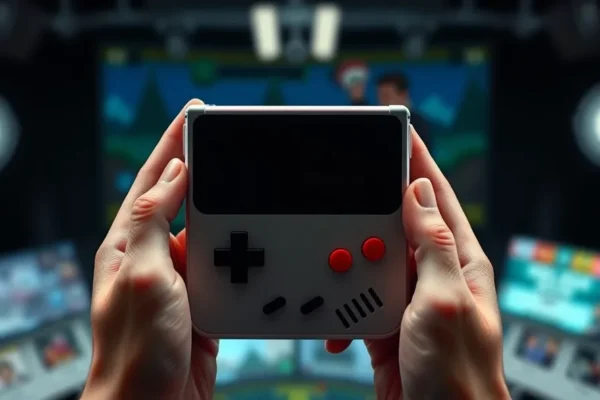
Meet the GamerCard: Your Pocket-Sized Trip Down Memory Lane
Ever feel a pang of nostalgia for those classic video games from your childhood? You know, the ones played on chunky consoles with joysticks that clicked like a metronome? The GamerCard is a new retro handheld console designed to bring those cherished gaming memories back to life, right in the palm of your hand. It’s essentially a portable powerhouse built to run emulators, which are like digital time machines for old game consoles. Think of it as a modern gadget that lets you play games from your NES, Super Nintendo, Game Boy, and even some arcade machines, all on one sleek device. If you’re someone who misses the golden age of gaming or wants to introduce a new generation to these timeless classics, this portable gaming device might be up your alley.
Playing Your Favorite Classics on the Go
So, what does the GamerCard actually do for you? Imagine this: you’re on a long commute, stuck in traffic, or waiting for an appointment. Instead of scrolling through your phone mindlessly, you can pull out the GamerCard and jump into a round of Super Mario World or a quick battle in Street Fighter II. It’s designed to be a no-fuss way to access a vast library of retro games.
For example, if you travel frequently, the GamerCard could be your ultimate travel companion. Instead of packing multiple old consoles or trying to set up an emulator on a laptop, you have all your favorite retro games ready to go. You could be playing Zelda: A Link to the Past on the plane or during a layover.
Or, if you manage a busy household, this retro emulator could be a fantastic way to unwind for a few minutes when you finally get a moment to yourself. Picture yourself on the couch after the kids are in bed, enjoying a nostalgic session of Tetris or Pokémon Red. It’s like having a personal arcade that fits in your pocket.
Who Should Consider This Retro Gaming Console?
The GamerCard is really aimed at a specific group of people.
Best for: Die-hard retro gaming enthusiasts who want a dedicated, portable device for playing classic games from various 8-bit and 16-bit systems. If you know your way around an emulator or are eager to learn, this might be for you.
Good for: Anyone looking for a portable way to relive their gaming youth or discover classic titles they missed. It’s also a neat gadget for those who appreciate well-designed hardware, especially if screen quality is a high priority.
Skip if: You’re looking for a device to play the latest AAA games, or if you expect a plug-and-play experience with zero setup. If you’re not comfortable with some initial configuration or if clunky interfaces drive you crazy, this might not be the best fit.
How the GamerCard Stacks Up Against Alternatives
In the world of retro handhelds, the GamerCard isn’t alone. You’ve got devices like the Anbernic RG35XX, the Miyoo Mini Plus, and even DIY Raspberry Pi handheld projects.
Compared to some of these, the GamerCard often boasts a particularly impressive screen. When you’re playing those pixelated classics, a vibrant, sharp display makes a huge difference, and the GamerCard aims to deliver on that front. However, where it tends to fall short is in its controls. Many competing Raspberry Pi handheld devices offer more ergonomic button layouts and better-feeling joysticks, which are crucial for those long gaming sessions. The GamerCard’s controls can sometimes feel cramped or awkward, which is a significant drawback for a gaming hardware review focused on usability. The software interface is another area where competitors often shine, offering more streamlined and user-friendly menu systems.
Getting Started: Setup, Ease of Use, and That Learning Curve
Here’s where things can get a little… involved. Setting up the GamerCard isn’t always as simple as turning it on and playing. While it comes pre-loaded with some systems, getting your own game ROMs (the digital files of your old games) onto the device often requires a bit of technical know-how. You’ll likely need to format a microSD card, copy ROMs over, and possibly even tweak some settings in the emulator software.
This means there’s definitely a learning curve. If you’re not comfortable with basic file management or understand terms like “ROMs” and “emulators,” you might find the initial setup frustrating. It doesn’t quite work like a modern gaming console where you just buy a game and it runs. However, for those who enjoy tinkering and customizing their devices, this can actually be part of the fun. Once set up, playing the games themselves is straightforward, but getting to that point requires patience.
The Real-World Wins: What Makes the GamerCard Shine
Despite its quirks, there are several genuine advantages to the GamerCard that you’ll actually experience.
- Stunning Display: As mentioned, the screen is a major highlight. Games look incredibly vibrant and sharp, making those classic pixel graphics pop. It truly enhances the retro gaming experience.
- Portability: It’s small and light enough to slip into a pocket or bag, making it genuinely portable. You can take your entire retro game library with you anywhere.
- Vast Game Compatibility: With the right emulators and ROMs, this handheld gaming screen can display games from a surprising number of classic consoles. It’s like carrying a museum of gaming history.
- Nostalgic Immersion: For those who grew up with these games, the GamerCard offers a deeply immersive way to reconnect with those cherished memories. Playing on a dedicated device feels more authentic than on a phone.
- Solid Build Quality (Mostly): The device itself often feels well-constructed, giving a sense of durability for everyday carry.
The Not-So-Great: Downsides and Limitations of the GamerCard
No gadget is perfect, and the GamerCard has its share of drawbacks.
- Awkward Controls: This is arguably the biggest pain point. The button layout can feel cramped, and the directional controls may not be responsive enough for precise gameplay in certain titles. Some users report hand fatigue during longer play sessions.
- Clunky Software Interface: Navigating the menus and managing your game library can be a chore. It often feels unpolished and unintuitive, requiring you to search for games rather than browse them easily.
- Battery Life Can Vary: While official specs might claim a certain playtime, real-world usage, especially with more demanding emulators, can drain the battery faster than you might hope. Expect to need a charger or power bank on longer excursions.
- Requires User Effort for Full Potential: As discussed, you can’t just buy it and play every game out of the box. Setting up your game library takes time and some technical comfort.
Price, Value, and Is It Worth Your Money?
The GamerCard typically sits in the mid-range for retro handhelds, often priced between $80 and $150, depending on the model and retailer. This makes it more affordable than some high-end emulation devices but pricier than very basic options.
Is it worth it? For the person who prioritizes an excellent screen and wants a dedicated retro gaming device, the price can be justified, especially if they’re willing to put in the effort for setup. However, if comfortable controls and an easy-to-use interface are paramount, you might find that the price is a bit steep given the drawbacks.
There aren’t usually significant hidden costs beyond the initial purchase, assuming you already have a way to acquire game ROMs (which should be legally obtained, of course). Cheaper alternatives might sacrifice screen quality or build, while more expensive ones often offer better ergonomics and software.
The Final Word: Should You Buy the GamerCard?
The GamerCard is a bit of a mixed bag. It nails the visual experience with its superb screen, making classic games look better than ever on a portable device. If your main goal is to see your beloved retro titles in their best light on the go, and you don’t mind a bit of a setup process and potentially less-than-ideal controls, then this retro handheld could be a good fit for you.
However, if comfort during extended play is your priority, or if you get easily frustrated with unintuitive software, you might want to look at other Raspberry Pi handheld options or consider a different portable gaming device altogether. It’s a niche product that excels in one key area (the screen) but compromises elsewhere.
Best use case: Casual retro gaming sessions where visual fidelity is key, and you have a patient approach to setup.
Frequently Asked Questions About the GamerCard
Is the GamerCard easy to set up?
Setting up the GamerCard to play your own games requires some technical comfort, including formatting an SD card and transferring game files (ROMs). It’s not a simple plug-and-play device.
How long does the battery last on the GamerCard?
Battery life can vary greatly depending on the games you’re playing and the emulators used, but expect anywhere from 4 to 8 hours of continuous play for most users.
Can I play modern games on the GamerCard?
No, the GamerCard is designed specifically for retro gaming emulators. It cannot play modern PC or console games.
What is the screen quality like on the GamerCard?
The GamerCard features a high-quality screen that offers vibrant colors and sharp resolution, making retro game graphics look excellent.
Are the gaming controls comfortable for long sessions?
Many users find the gaming controls to be a bit cramped and not ideal for extended play sessions, which can lead to hand fatigue. This is a common point of criticism in GamerCard reviews.
Where can I buy the GamerCard?
The GamerCard is typically available through online retailers specializing in retro gaming hardware or directly from the manufacturer’s website.
Product prices and availability vary by region. Verify current pricing before purchase.