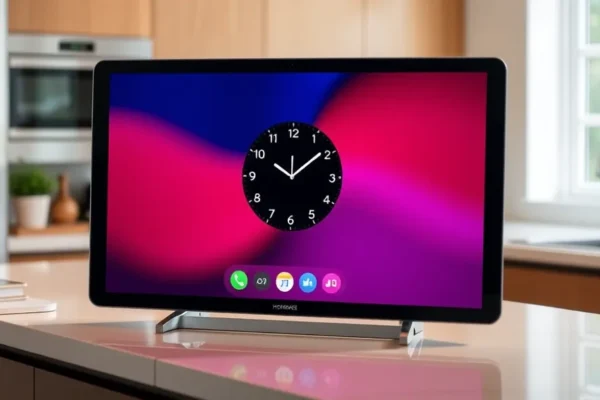
Meet the Apple HomeView Smart Display
Imagine a device that acts like a helpful hub for your home, much like your iPhone is your hub for your digital life or your Apple Watch keeps you connected on the go. That’s essentially what the Apple HomeView smart display aims to be. It’s a screen designed to sit on a counter or table, bringing together your smart home gadgets, your Apple services, and a bit of personalized flair right into your living space. If you’re already deep in the Apple ecosystem – you love your iPhone, use Apple Music, and maybe have an Apple Watch – this device is built with you in mind. It aims to make managing your home tech, getting quick information, and even enjoying some entertainment a whole lot simpler and more stylish.
What This Gadget Does in Your Everyday Life
The Apple HomeView smart display is all about making your home life smoother and more connected. Think of it as a central dashboard for your smart home. You can ask it to turn on lights, adjust the thermostat, or even show you who’s at the front door if you have a compatible camera. It also plays nicely with your Apple devices. You can ask Siri questions, get weather updates, check your calendar, or even make video calls, just like you would on your iPhone or iPad. A key feature is its customizable “faces,” similar to your Apple Watch. You can choose what information appears on the screen – a clock, photos from your iCloud library, weather forecasts, upcoming appointments, or even helpful widgets for your smart home devices. It’s designed to be glanceable and useful, providing the information you need without you having to pull out your phone.
Here are a couple of real-world scenarios:
- For the Busy Household Manager: Imagine starting your day. You walk into the kitchen, and the HomeView display shows your personalized morning face: the time, the weather forecast, your first calendar appointment, and maybe a widget showing your smart thermostat is set to a comfortable temperature. You can ask Siri, “Good morning, what’s on my schedule today?” and it reads out your appointments. Later, you can ask it to play your favorite morning playlist on Apple Music.
- For the Traveler: If you’re heading out for a trip, you can quickly glance at the HomeView display to see your flight status if it’s linked to your calendar, or check the weather at your destination. Before you leave, you can simply say, “Hey Siri, I’m leaving,” and it can turn off lights and adjust your smart thermostat to save energy.
Who Should Seriously Consider the Apple HomeView
This smart display is really best for existing Apple users who have embraced the Apple ecosystem. If you own an iPhone and perhaps an Apple Watch, and you’re looking for a more integrated smart home experience, this device will likely feel very familiar and intuitive. It’s for people who appreciate Apple’s design aesthetic and user-friendly interface and want to extend that into their home automation and daily routines. If you value simplicity, a clean look, and seamless integration with Apple services like Siri, Calendar, Photos, and Apple Music, the HomeView is a strong contender.
Good for: Those who are gradually building a smart home and want a central, attractive control panel that works well with their current Apple devices. It’s also great for individuals or families who want a digital photo frame that can do more than just display pictures.
Skip if: You’re not an Apple user, you prefer a wider range of third-party app support on a smart display, or if deep customization options beyond what Apple offers are a must-have for you. Also, if your primary need is a super-loud smart speaker for parties, this might not be its strongest suit.
How the Apple HomeView Stacks Up Against Others
The smart display market is quite crowded, with major players like Amazon’s Echo Show devices and Google’s Nest Hubs being the most prominent alternatives. Apple HomeView enters this space with its signature focus on Apple ecosystem integration. Unlike Echo Show or Nest Hub, which are designed to work with a wide array of services from various companies, the HomeView is most compelling for those already invested in Apple’s world. Its strength lies in how seamlessly it integrates with your iPhone, Apple Watch, and other Apple products. For example, if you use Apple HomeKit for your smart home devices, the HomeView offers a dedicated and intuitive interface for managing them, akin to how your iPhone handles HomeKit. Google Nest Hubs, on the other hand, often have a slight edge in general knowledge questions thanks to Google Search integration, and Amazon’s Echo Show offers a vast selection of skills and integrates deeply with Amazon’s services.
In terms of design, Apple typically charges a premium, and the HomeView is expected to follow suit. While competitors like the Nest Hub and Echo Show offer devices at various price points, Apple’s approach tends to be more focused on a premium experience, which usually comes with a higher price tag. The key difference is the ecosystem lock-in; if you’re an Apple user, the HomeView feels like a natural extension, whereas Amazon and Google devices are more platform-agnostic.
Getting Started and Learning the Ropes
For anyone familiar with setting up an iPhone or Apple Watch, the setup process for the Apple HomeView should feel very straightforward. It’s designed to be plugged in, connected to your Wi-Fi, and then paired with your Apple ID. Much of the initial configuration happens directly on your iPhone, making it a guided and relatively painless experience. You’ll likely be prompted to select your preferred Apple services and set up your initial display face within minutes. Most everyday tasks, like asking Siri questions, checking the weather, or controlling smart home devices through HomeKit, are intuitive and require no special technical knowledge. The learning curve is gentle, especially if you’re accustomed to interacting with Siri on other Apple devices. Think of it like learning a new app on your iPhone; after a little bit of exploration, it becomes second nature.
The Real-World Advantages of the Apple HomeView
- Seamless Apple Ecosystem Integration: This is the HomeView’s superpower. It works incredibly well with your iPhone, Apple Watch, and other Apple devices. Features like Handoff, where you can start a task on one device and finish it on another, feel natural. User feedback often highlights how convenient it is to have Siri respond instantly and accurately to commands, leveraging your existing Apple ID and services.
- Elegant and Customizable Displays: The ability to customize the display face, similar to your Apple Watch, is a major plus. You can choose a clean clock face, a slideshow of your cherished iCloud photos, or a dashboard with useful widgets. This makes it not just a gadget, but a piece of home decor that can be personalized to your taste. Published reviews often praise its sleek design and how it blends into modern home aesthetics.
- Privacy-Focused Design: Apple generally emphasizes privacy, and the HomeView is expected to follow suit with features like on-device processing for many Siri requests and clear indicators when the microphone or camera (if applicable) is active. This is a significant differentiator for users who are concerned about data privacy with smart home devices.
- Intuitive Siri Integration: For those who use Siri regularly on their iPhone or Apple Watch, the experience on the HomeView will be familiar and responsive. Controlling smart home devices through Apple HomeKit commands is straightforward and reliable, which is a big win for managing your connected home.
Honest Drawbacks and Limitations to Consider
- Limited Third-Party App Support: Unlike smart displays from Amazon or Google, the Apple HomeView is expected to have a more curated and restricted approach to third-party app integration. If you rely on specific apps for smart home control, entertainment, or other functionalities that aren’t directly supported by Apple or its core partners, you might find it lacking.
- Exclusivity to the Apple Ecosystem: While a strength for Apple users, this is a significant limitation for everyone else. If you use an Android phone or have smart home devices that aren’t compatible with Apple HomeKit, the HomeView might not be the central hub you’re looking for. It strongly encourages or even necessitates adherence to Apple’s walled garden.
- Potential for Higher Price Point: Apple products are generally positioned at a premium, and the HomeView is unlikely to be an exception. This means the cost of entry could be higher compared to similar devices from competitors, making it less accessible for budget-conscious consumers.
- Siri’s Capabilities Compared to Competitors: While Siri is excellent for many tasks within the Apple ecosystem, some users find that Google Assistant (on Nest Hubs) or Alexa (on Echo Show) offer broader general knowledge and a wider range of “skills” or integrations for more complex queries or niche smart home devices.
Price, Value, and Your Wallet
As of now, the official pricing for the Apple HomeView hasn’t been fully detailed, but based on Apple’s product strategy, expect it to sit at the higher end of the smart display market. Comparable devices from competitors like the Amazon Echo Show 15 or Google Nest Hub Max can range from $150 to $250 or more. Apple’s pricing typically reflects its premium build quality, design, and ecosystem integration. For existing Apple users who plan to heavily utilize its integration with iPhones, Apple Watch, and HomeKit devices, the value proposition could be strong, especially if they are willing to pay for that seamless experience. However, if you’re not deeply embedded in the Apple ecosystem, the price might feel harder to justify when more affordable and broadly compatible options exist.
There are unlikely to be significant hidden costs, as Apple tends to be upfront about its pricing. Accessories would be minimal, likely focused on aesthetic choices rather than essential functionality. For those on a tighter budget, Google Nest Hubs or Amazon Echo Shows offer excellent functionality at lower price points, serving as capable alternatives for general smart display needs.
The Final Verdict: Should You Buy the Apple HomeView?
The Apple HomeView smart display is a compelling device, but its appeal is very targeted. If you are a devoted Apple user, owning an iPhone and potentially an Apple Watch, and you’re looking to enhance your smart home experience with a beautifully designed, intuitive hub that seamlessly integrates with your existing Apple services, then the Apple HomeView is likely a fantastic addition to your home. Its customizable faces, strong privacy focus, and deep ecosystem integration make it a standout choice for this demographic.
However, if you’re an Android user, or if you don’t prioritize Apple services, or if you need the broadest possible compatibility with a vast array of smart home gadgets from different brands, you might be better served by looking at smart displays from Amazon or Google. The HomeView is best suited for those who want their smart display to feel like a natural extension of their iPhone, offering a curated and premium experience.
Common Questions About the Apple HomeView
What is the Apple HomeView smart display?
The Apple HomeView is a smart display device that acts as a central hub for your home, offering smart home control, information glanceability, and integration with Apple services, much like an iPhone or Apple Watch.
How is it similar to an iPhone or Apple Watch?
It shares similarities through its customizable “faces” for displaying information, integration with Siri for voice commands, and seamless connection to your Apple ecosystem, offering a familiar user experience.
Is the Apple HomeView good for home automation?
Yes, it is designed to be a strong contender for home automation, particularly for users who already utilize Apple HomeKit for their smart home devices, offering intuitive control and management.
What kind of customizable faces does it have?
You can expect customizable faces that can display clocks, weather forecasts, personal photos from iCloud, calendar appointments, and widgets for smart home controls, similar to how you personalize your Apple Watch.
Who is the ideal user for an Apple HomeView?
The ideal user is someone who is already invested in the Apple ecosystem, owning an iPhone and other Apple products, and desires a device that seamlessly integrates with their current tech setup.
How does it compare to Amazon Echo Show or Google Nest Hub?
It offers deeper integration with Apple services and a more curated, privacy-focused experience compared to Amazon and Google devices, which often have broader third-party app support and work across multiple mobile platforms.
Product prices and availability vary by region. Verify current pricing before purchase