Is the Razer Barracuda V2 Pro the Perfect Hybrid Headset?
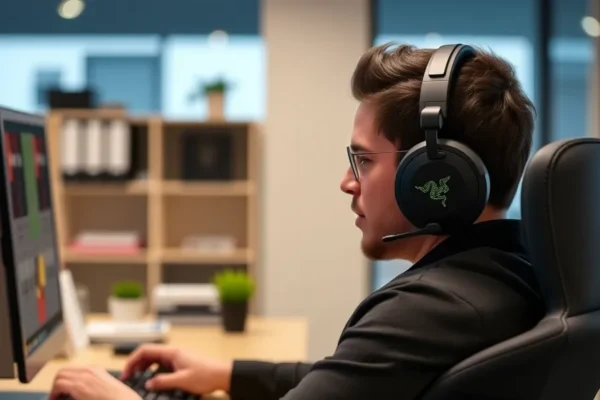
If you have ever felt like your desk is cluttered with too many gadgets, the Razer Barracuda V2 Pro might just be your new best friend. This wireless headset is designed to bridge the gap between two very different worlds: intense gaming sessions and professional office work. While many headsets are built exclusively for gaming with flashy lights and aggressive designs, this model takes a more sophisticated, understated approach. It aims to be the only piece of audio gear you need for your morning meetings, your afternoon commute, and your evening gaming sessions.
Living With a Hybrid Headset
The Razer Barracuda V2 Pro is built for flexibility. In practice, this means you can switch between your gaming PC and your phone seamlessly. Imagine you are working from home and sitting in a long video conference. With this headset, you stay connected to your work laptop, but the moment a call comes in on your phone, the headset can switch over so you don’t miss a beat. It feels like having a personal assistant for your ears.
If you travel frequently, you will appreciate how easy it is to throw this into a bag. Unlike headsets with long, protruding microphones, this one features a built-in “invisible” microphone array. It doesn’t look like you are a pilot while walking through an airport or sitting in a coffee shop. If you manage a busy household, you can rely on the integrated noise cancellation to keep your focus on the task at hand rather than the background noise of family life.
Who Should Add This to Their Setup?
This headset is best for the “hybrid human” who doesn’t want to own two separate devices. It is an excellent choice for professionals who game after hours and want a device that looks professional on camera. However, you should skip this if you are a competitive e-sports player who demands a wired connection for zero latency, or if you prefer a dedicated, boom-style microphone for studio-quality streaming voiceovers. It is a jack-of-all-trades, which means it excels at versatility rather than extreme specialization.
How It Compares to the Competition
When you look at the Razer Barracuda V2 Pro review landscape, the most common competitors are the SteelSeries Arctis Nova Pro Wireless and the Sony INZONE H9. The SteelSeries option offers a hot-swappable battery system that is arguably more convenient for 24/7 users, but the design is more “gamer-centric.” The Sony H9 offers better active noise cancellation, but it lacks the same level of cross-platform connectivity that Razer has perfected here. The Barracuda V2 Pro sits in a middle ground; it is more stylish for the office than the SteelSeries and more gaming-capable than the Sony, making it a strong value proposition for the price.
Getting Started Without a Headache
Setting up the headset is straightforward. It comes with a small USB-C dongle that acts as the primary brain for your connection. Simply plug it into your computer or console, and the headset pairs automatically. For mobile use, you can connect via Bluetooth with a simple button press. There is almost no learning curve here. You might spend five minutes downloading the Razer Synapse software on your PC if you want to tweak the audio equalizer, but for most people, the out-of-the-box sound profile is more than enough to start using immediately.
Real World Pros of the Razer Barracuda V2 Pro
- Multi-Device Magic: The ability to stay connected to your phone and PC simultaneously is a massive productivity booster.
- Understated Design: It looks like a high-end pair of consumer headphones, making it perfectly acceptable for a Zoom call or a train ride.
- Comfort for Long Sessions: The memory foam cushions are soft and breathable, meaning they don’t get “hot” after two or three hours of wear.
- Reliable Battery: Users consistently report getting around 40 hours of playtime on a single charge, which is plenty for a full work week plus gaming.
Common Drawbacks and Frustrations
No device is perfect, and users have noted a few limitations. First, the microphone quality, while clear for voice chats and meetings, doesn’t quite match a high-end dedicated boom microphone. Second, the touch controls on the earcups can be a bit sensitive; some users report accidentally muting themselves when adjusting the volume. Finally, if you have a very large head, the clamping force can feel slightly tight during the first few days of use until the headband softens up.
Value and Pricing
As of late 2024, the Razer Barracuda V2 Pro is positioned as a premium product. It carries a higher price tag than entry-level gaming headsets, but you are paying for the build quality and the dual-use technology. If you compare it to buying a decent $100 office headset and a $150 gaming headset, the combined cost makes this $200+ investment feel like a sensible consolidation. It holds up well over time, provided you aren’t tossing it around, and it represents a “buy once, cry once” philosophy for tech gear.
The Final Verdict
Is the Razer Barracuda V2 Pro worth your money? If you value a clean, clutter-free desk and want one headset that handles everything from spreadsheets to high-stakes gaming, the answer is a resounding yes. It is the perfect daily driver for the modern remote worker or the student who needs one device to do it all. If you are a hardcore audiophile or a professional streamer, look elsewhere for specialized gear. For everyone else, this is a top-tier contender for the most useful gadget on your desk.
Common Questions About the Barracuda V2 Pro
Is this the best Razer Barracuda V2 Pro review summary for productivity?
Yes, this overview highlights its primary strength: the ability to juggle work calls and personal gaming without switching hardware, which is the definition of a productivity-focused headset.
Can I use this gaming headset for office calls?
Absolutely. Its design is subtle enough for professional settings, and the microphone is more than capable of providing clear voice quality for video conferences.
How long does the battery last in the real world?
While the company claims higher numbers, most users find it provides about 35 to 40 hours of use, which is excellent for a wireless headset in this category.
Do I need special software for this wireless headset?
You do not need software to get audio, but downloading the Razer software is recommended if you want to customize the equalizer or save specific audio profiles for different games.
Is this good for traveling?
It is excellent for travel because it lacks a bulky boom microphone and features a sleek, foldable design that fits easily into a standard backpack.
Product prices and availability vary by region. Verify current pricing before purchase.