Can You Really Turn Your iPhone Into a Desktop Computer?
Most of us carry a powerful computer in our pocket every single day. The iPhone is capable of editing 4K video, managing complex spreadsheets, and handling professional-grade graphic design. But can it actually replace your laptop for a full day of work? Creating an iPhone workstation is a popular trend for minimalists and frequent travelers, but it comes with a unique set of rewards and compromises.
Setting up an iPhone duo work environment involves connecting your phone to a portable keyboard, a mouse or trackpad, and potentially an external display. It is designed for those who want to shed the bulk of a traditional laptop while maintaining the ability to get serious work done on the go. Whether you are a digital nomad or just looking for an emergency workstation when your main computer fails, understanding the practical limits of this setup is key to your productivity.
Daily Productivity With a Pocket Computer
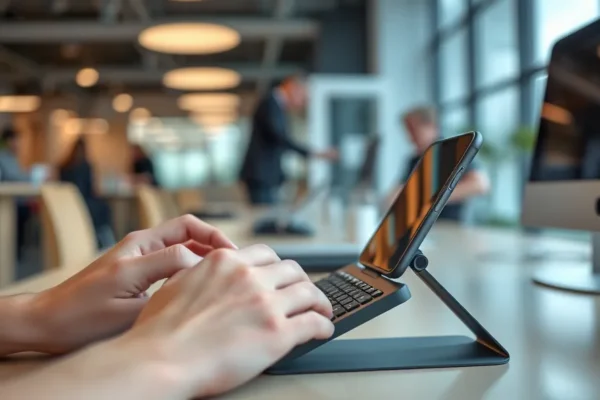
Transforming your phone into a mobile office setup changes the way you interact with your digital life. Instead of being hunched over a screen, you are working from an ergonomic stance. Imagine you are sitting in a coffee shop or a quiet corner of an airport. You unfold a slim, foldable portable keyboard, tap your iPhone into a stand, and pair a Bluetooth mouse. Suddenly, your phone behaves more like a compact desktop computer.
For a writer, this means drafting long-form content in a dedicated app like Ulysses or Notion while using keyboard shortcuts to toggle between windows. For a small business owner, it means managing customer emails and checking inventory logs on a larger external screen using a USB-C adapter. It feels efficient because you are removing the clutter of extra operating systems and focusing entirely on the apps you already know how to use.
Who Should Consider an iPhone Workstation?
Building an iPhone productivity hub isn’t for everyone. It is best for light-to-medium power users who prioritize portability above all else. If you are a freelance writer, a student, or someone who primarily works in web-based apps, this setup can be a game changer. It is also excellent for professionals who travel light and only need a “just-in-case” device to handle emails and minor document edits.
However, you should skip this if your job requires heavy file management, complex multitasking between desktop-only software, or sustained high-performance computing. If you spend your day in Adobe Creative Cloud or managing massive Excel macros, a dedicated laptop remains the superior choice.
How Does This Compare to a Laptop or Tablet?
Comparing an iPhone workstation to a MacBook or an iPad is an exercise in trade-offs. A MacBook is a self-contained, high-performance machine that handles everything with ease. An iPad Pro with a Magic Keyboard feels closer to a real computer because of its screen size and operating system tweaks. The iPhone, by contrast, is significantly more portable. You likely already own it, so the cost of entry is lower than buying a second device.
The main difference is the interface. While the iPhone is fast, the software is designed for touch. Even with a mouse and keyboard, you are still navigating mobile apps. Some apps may not support side-by-side split screens effectively, which can feel restrictive compared to a laptop. You are trading raw capability for the ultimate convenience of carrying only one device for both your personal and professional life.
Getting Started and Overcoming the Learning Curve
Getting your system running is relatively intuitive but requires some initial investment in accessories. You will need a reliable Bluetooth keyboard, a mouse that supports iPadOS or iOS, and a sturdy phone stand. If you want to use an external monitor, you will also need a USB-C to HDMI adapter or a hub.
The learning curve is not about the hardware, but the software limitations. You will need to learn which apps are “keyboard-friendly.” For example, standard mobile versions of apps might hide features that are obvious on a desktop. You should expect to spend a few hours testing your favorite apps to see how they behave with a physical keyboard. Once you identify which apps support full-screen modes and shortcuts, the experience becomes much smoother.
The Real-World Wins of an iPhone Setup
- Extreme Portability: You can carry your entire office in a small jacket pocket or a tiny bag.
- Unified Ecosystem: Since all your files and messages are already on your phone, there is no need to sync data between devices.
- Minimalist Focus: By working on a smaller, phone-based interface, you are often less likely to get distracted by browser tabs and background clutter.
- Cost Effective: If you already own an iPhone, you only need to spend money on a few basic peripherals, saving hundreds or thousands of dollars compared to buying a new laptop.
The Hurdles and Limitations
- iOS Limitations: The biggest drawback is that many apps are scaled-down versions of their desktop counterparts, often missing advanced features like bulk file conversion or complex data manipulation.
- Multitasking Frictions: Switching between apps isn’t as fast as a desktop. You may find yourself spending extra time managing windows or dealing with app refreshes.
- Battery Drain: Using your phone as a primary workstation will drain your battery much faster than normal. You will almost certainly need to carry a portable power bank for a full-day work challenge.
Is This Setup Worth the Cost?
The cost of entry is impressively low. You can put together a decent mobile office setup for under $100 if you stick to third-party Bluetooth keyboards and basic stands. The value is found in the freedom of movement. For someone who hates lugging around a heavy backpack, this setup pays for itself in sheer convenience. However, if you find yourself needing to buy expensive adapters, high-end mechanical keyboards, and external monitors, the cost approaches that of an entry-level laptop, which may be a better investment for your specific needs.
Final Thoughts on the iPhone Workstation
Using an iPhone as a primary workstation is a brilliant experiment for those who prize mobility, but it is not a direct replacement for a professional-grade laptop for most people. If your work is centered on communication, writing, and cloud-based management, it is a fun and highly efficient way to work. If your workflow is complex, you will likely find the software limitations to be a source of frustration. Approach this as a secondary, highly portable setup rather than a complete replacement for your main machine.
Common Questions and Answers
Is an iPhone workstation truly a replacement for a laptop?
For most users, no. It serves best as an emergency workstation or a tool for light tasks. It is excellent for writing and email but lacks the power for heavy professional tasks.
Do I need expensive apps to make this work?
Generally, no. Most standard productivity apps like Notion, Google Workspace, and Microsoft Office work well with external keyboards. You just need to learn the keyboard shortcuts specific to iOS.
Can I use my iPhone with any monitor?
You can connect to most HDMI monitors using a Lightning or USB-C to HDMI adapter, but keep in mind that the iPhone will mirror its display, which may result in black bars since the aspect ratios don’t always match.
How long does the battery last during a full-day work challenge?
Heavy use, such as constant emailing and web browsing, will likely drain an iPhone in 4 to 6 hours. Carrying a portable battery is essential for a full day of work.
Is it hard to set up a mobile office setup?
It is very easy. Most accessories pair via Bluetooth, and iOS automatically recognizes keyboards and mice as soon as they connect. You can be up and running in under a minute.
Product prices and availability vary by region. Verify current pricing before purchase.