

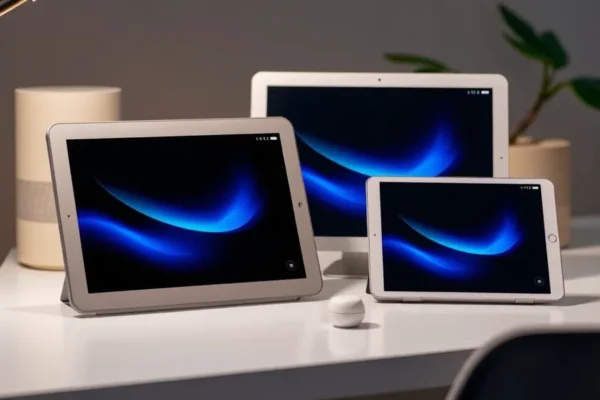
Meet the New Amazon Alexa Tablets: More Than Just a Smart Speaker
So, Amazon’s gone and done it again, expanding its tablet lineup with the new Amazon Alexa Tablets, including the fancy 12 Pro, the solid 11, and the budget-friendly 8. What’s the big deal? Well, these aren’t just tablets that happen to have Alexa built-in; they’re full-fledged Android tablets that also bring the convenience of Amazon’s voice assistant into your hands. Think of them as your digital Swiss Army knife – useful for everything from browsing the web and streaming your favorite shows to managing your smart home and keeping the kids entertained. If you’ve been curious about tablets but find the usual options a bit overwhelming or expensive, or if you’re already deep in the Amazon ecosystem, these new Amazon Alexa Tablets are worth a closer look. They aim to make everyday tasks easier and provide a more integrated smart home experience.
How These Amazon Alexa Tablets Fit into Your Daily Life
Imagine waking up and asking your tablet, “What’s on my calendar today?” or “What’s the weather like?” before you even get out of bed. That’s just the start. These Amazon Alexa Tablets can be your kitchen companion, displaying recipes step-by-step while your hands are covered in flour. They can act as your family’s command center, letting you broadcast messages to other Alexa-enabled devices in the house or leave video notes for family members.
For example, if you travel frequently, the Alexa Tablet 11 or 12 Pro could be your portable entertainment hub for flights, loaded with downloaded movies and books, all while still letting you check your home’s security cameras via Alexa. For busy households, imagine using the Alexa Tablet 8 to set timers for homework, play educational games with the kids, or even make hands-free video calls to grandparents. It’s about making life a little smoother, a little more connected, and a lot more convenient.
Who Will Love These Amazon Alexa Tablets?
Best for: Existing Amazon Echo and Prime members who want a tablet that seamlessly integrates with their smart home and offers a familiar voice assistant experience. Also great for families looking for a dedicated, kid-friendly device that can grow with their children.
Good for: Anyone seeking an affordable and capable Android tablet for general use like browsing, streaming, and light productivity. If you appreciate the simplicity of voice commands and want a device that can also serve as a central hub for smart home control, these are a solid choice.
Skip if: You’re a power user who needs the absolute best performance for demanding apps and multitasking, or if you heavily rely on the full Google ecosystem and prefer a pure Android experience without Amazon’s services front and center. If you’re not invested in the Alexa ecosystem, the primary draw might be less compelling.
How the Amazon Alexa Tablets Stack Up Against the Rest
The main competition for these Amazon Alexa Tablets comes from other Android tablets like Samsung’s Galaxy Tab series and, of course, Apple’s iPads. Compared to the Amazon tablets, Samsung often offers more powerful processors and more customization options within Android. Apple’s iPads, while typically more expensive, are renowned for their polished user interface, vast app ecosystem, and strong performance, especially for creative tasks.
What sets the Amazon Alexa Tablets apart is their deep integration with Alexa. You get a powerful voice assistant that can control a wide range of smart home devices right out of the box, a feature that often requires additional setup or third-party apps on other tablets. The inclusion of the Google Play Store on these new models, alongside Amazon’s own app store, significantly expands their app capabilities compared to older Fire tablets, making them much more versatile. In terms of price, the Amazon Alexa Tablets generally fall into a more budget-friendly category than comparable iPads or higher-end Samsung tablets, offering excellent value for the features they provide.
Getting Started: Setup, Ease of Use, and the Learning Curve
Setting up one of these Amazon Alexa Tablets is generally straightforward, especially if you already have an Amazon account. The process guides you through connecting to Wi-Fi, signing into your Amazon account (which links your Alexa profile, Prime Video, Kindle, etc.), and then you’re prompted to download apps from both the Amazon Appstore and the Google Play Store. This dual app store access is a big win for usability.
For most everyday tasks – browsing, watching videos, using Alexa – the tablets are quite intuitive. The interface is clean and easy to navigate. If you’re familiar with Amazon’s Fire tablets, the experience will feel very similar. The learning curve is minimal for basic functions. The real “learning” comes in discovering all the different ways you can use Alexa for commands, controlling smart home devices, or setting up routines. This can take a little time to explore but is more about discovering features than understanding complex operations. Overall, it’s a user-friendly experience designed for broad appeal.
The Real-World Perks You’ll Actually Enjoy
- Seamless Alexa Integration: This is the star. It works like having a smart speaker and a tablet combined, making it incredibly easy to control smart lights, thermostats, or even order groceries with your voice.
- Google Play Store Access: This is a game-changer compared to older Amazon tablets. Now you can download your favorite apps like Netflix, Spotify, and a vast array of games and productivity tools directly from Google Play. This makes them far more versatile.
- Kid-Friendly Options: The dedicated Kids Edition versions come with robust parental controls, a durable case, and a year of Amazon Kids+ content. This is a huge relief for parents wanting a safe and engaging digital space for their children.
- Vibrant Displays for Entertainment: Whether it’s watching Prime Video, YouTube, or reading on Kindle, the screens are bright and colorful, making them enjoyable for media consumption. The larger screen sizes on the 11 and 12 Pro models enhance this experience.
- Decent Battery Life for Daily Use: For typical browsing, streaming, and Alexa interactions, these tablets offer battery life that should get you through a good chunk of the day without needing a constant charge. Official specs suggest around 10-12 hours of mixed use for the 11 and 12 Pro.
Honest Downsides and Where They Fall Short
- Performance Isn’t Top-Tier: While perfectly adequate for everyday tasks, don’t expect the lightning-fast responsiveness you’d find on high-end tablets. More demanding games or heavy multitasking can sometimes feel a bit sluggish, especially on the Alexa Tablet 8.
- Amazon Ecosystem Emphasis: While the Google Play Store is available, Amazon’s services (Prime Video, Kindle, Audible, etc.) are often front and center in the user interface. If you’re not an Amazon user, this can feel a bit like bloatware.
- Camera Quality is Basic: Like most Amazon tablets, the cameras are functional for video calls or quick snaps but won’t be replacing your smartphone for photography. Don’t expect stunning detail or low-light performance.
- Build Quality Varies: While the Kids Editions have sturdy cases, the standard models, particularly the Alexa Tablet 8, can feel a bit plasticky and less premium compared to competitors. Durability is good for the price, but they aren’t built to withstand extreme abuse.
Price, Value, and Is It Worth Your Money?
The Amazon Alexa Tablets offer a compelling price point, making them accessible to a wider audience. The Alexa Tablet 8 often starts around $100, the Alexa Tablet 11 typically around $150, and the Alexa Tablet 12 Pro a bit higher, around $230 (prices vary and sales are common).
For the features packed in, especially the Alexa integration and now the Google Play Store, this represents good value. If you’re already invested in the Amazon ecosystem or looking for a capable family tablet, the price is definitely justifiable. Compared to an iPad, you’re saving hundreds of dollars. Even compared to similarly priced Android tablets, the unique Alexa smarts add significant value. There aren’t many hidden costs beyond potentially buying a better case or screen protector if you don’t opt for a Kids Edition. Long-term value is decent for casual use, but if you’re hard on devices or need cutting-edge performance, you might find yourself wanting an upgrade sooner.
The Final Word: Should You Buy an Amazon Alexa Tablet?
If you’re looking for an affordable, versatile tablet that doubles as a smart home controller and offers access to a vast library of apps via the Google Play Store, the new Amazon Alexa Tablets are a strong contender. They are particularly excellent for families thanks to the kid-friendly options and robust parental controls.
However, if you demand top-tier performance for demanding applications or gaming, or if you prefer a purely Google-centric Android experience without Amazon’s services integrated, you might be better off exploring other Android tablet brands or even an iPad. For most everyday users who want convenience, entertainment, and smart home control in one package without breaking the bank, these Amazon Alexa Tablets are definitely worth considering. The Alexa Tablet 11 strikes a great balance between screen size and price for general use.
Common Questions About Amazon Alexa Tablets
Is the Google Play Store really available on these Amazon Alexa Tablets?
Yes, unlike older Fire tablets, these new Amazon Alexa Tablets come with full access to the Google Play Store, giving you a much wider selection of apps beyond Amazon’s own store.
How long does the battery on these Amazon Alexa Tablets typically last?
For general use like browsing and streaming, you can expect around 10-12 hours of battery life from the Alexa Tablet 11 and 12 Pro, with the Alexa Tablet 8 offering slightly less. This is sufficient for a full day of moderate use.
Are these Amazon Alexa Tablets good for kids?
Absolutely. The Kids Editions come with a durable case, advanced parental controls, and a subscription to Amazon Kids+ content, making them a safe and engaging choice for children.
Do I need an Amazon Prime membership to use these Amazon Alexa Tablets?
No, you don’t need Prime to use the tablet for general browsing, apps, or Alexa commands. However, a Prime membership unlocks benefits like Prime Video and Kindle Unlimited content, which are deeply integrated.
What are the main differences between the Alexa Tablet 12 Pro, 11, and 8?
The main differences are screen size (12-inch for the Pro, 11-inch for the 11, 8-inch for the 8), processing power (the Pro and 11 are more capable), and build materials. The 12 Pro also offers premium features like a better display.
Can I use these Amazon Alexa Tablets for video calls?
Yes, all models have built-in cameras suitable for video calls, and you can download popular video conferencing apps from the Google Play Store.
Product prices and availability vary by region. Verify current pricing before purchase.











