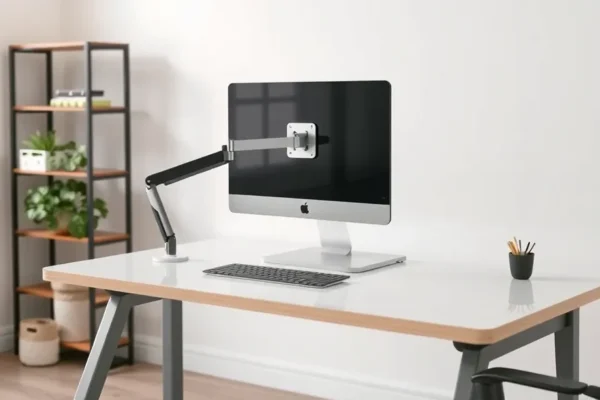
Feeling like your desk is a disaster zone? Cables everywhere, monitors hogging precious surface area – it’s a recipe for frustration. In 2026, reclaiming your workspace is easier than ever with smart solutions like monitor arms. These aren’t just fancy gadgets; they’re key players in creating a cleaner, more organized, and even more productive desk. If you’re tired of the clutter and want to upgrade your daily grind, it’s time to talk about the best monitor arms for getting your desk space back.
Taming the Desk Chaos: What Are Monitor Arms Anyway?
Simply put, a monitor arm is a stand that attaches your computer monitor to your desk, usually via a clamp or by bolting through a grommet hole. Instead of your monitor sitting on its bulky stand, it floats in the air, attached to an adjustable arm. This immediately frees up a huge chunk of your desk surface. Think of it like getting extra real estate without adding any physical space to your room. They’re designed for anyone who uses a computer monitor and wants a tidier setup, whether you’re working from home, gaming, or just trying to make your everyday computing experience less cramped. If a cluttered desk is causing you stress or hindering your efficiency, you should care about monitor arms right now because they offer a practical, immediate fix.
Making Your Desk Work for You: Real-World Use Cases
Imagine this: your monitor is no longer fixed in one spot. With a monitor arm, you can easily swing your screen closer for detailed work, tilt it back for comfortable reading, or even pivot it to portrait mode for scrolling through long documents or code. It’s like having a flexible assistant for your display.
Scenario 1: The Home Office Warrior
You’re juggling video calls, spreadsheets, and endless research. With a dual monitor arm, you can position two screens side-by-side at the perfect height and angle, eliminating neck strain. When a video call comes in, you can easily swivel one monitor to face you directly, then swing it back when the call ends, all without disturbing your workflow. Cable management clips on the arm keep all those power and HDMI cords neatly tucked away, making your workspace look as professional as it feels.
Scenario 2: The Creative Professional
As a designer or video editor, precise screen positioning is crucial. A single monitor arm allows you to bring your large, high-resolution display exactly where you need it, then push it back to maximize your desk space when you’re done. This means you can have a large canvas right in front of you for detailed editing, and then create a clean surface for sketching or reviewing physical printouts.
Scenario 3: The Compact Space Dweller
Living in a smaller apartment or dorm room? Every inch of desk space counts. A monitor arm lifts your display off the desk entirely, instantly giving you room for your keyboard, mouse, a notebook, or even a small plant. It transforms a cramped corner into a functional and inviting workspace.
Who Should Embrace the Monitor Arm Life?
Best For: Anyone who wants to declutter their desk and improve ergonomics. If you spend significant hours at your computer, a monitor arm can make a world of difference in comfort and productivity. Users with standing desks will also find them invaluable for easy screen adjustment as they change positions.
Good For: Gamers who need optimal screen placement for immersive play and want a cleaner setup. Students who want to maximize limited dorm or study space. Anyone who finds themselves constantly shifting their monitor to get a better view or more desk room.
Skip If: You rarely use your computer or have a very basic setup where desk space isn’t an issue. If you have very old or extremely heavy monitors that exceed the arm’s weight capacity (always check specs!), or if your desk has a very fragile or unusual edge that can’t support a clamp.
How These Monitor Arms Stack Up Against the Rest
When looking for the best monitor arms in 2026, we considered several popular and well-regarded options. While there are countless models, we focused on those that offer excellent desk space saving, robust build quality, and user-friendly features. Alternatives range from simple desk stands that offer a slight height adjustment to more complex articulating arms. The key difference with these top-tier monitor arms is their smooth, effortless adjustability and superior cable management systems.
For example, while a basic stand might cost $20-$40, a good monitor arm like the ErgoLift Pro Dual typically starts around $100-$150. You’re paying for the increased flexibility, the space-saving design, and the long-term ergonomic benefits. Cheaper arms might feel flimsy or lack smooth movement, while premium options offer a more refined experience. We’ve focused on models that strike a good balance between quality and price, offering substantial value without breaking the bank.
Getting Started: Setup Made Simple
Setting up a monitor arm is surprisingly straightforward, even if you’re not a tech whiz. Most arms use a clamp that attaches to the edge of your desk, or they can be mounted through a pre-existing grommet hole. You’ll typically need a screwdriver (often included) and maybe a wrench. The process usually involves attaching the arm to your desk, then attaching your monitor to the arm’s mounting plate using VESA screws.
The whole process, for a single monitor arm, can take anywhere from 15 to 30 minutes. Dual monitor arms might take a little longer, perhaps 30 to 45 minutes. The learning curve is minimal; it’s mostly about following the included instructions. Some users report that getting the tension just right on the arm for their monitor’s weight can take a bit of tweaking, but this is usually a one-time adjustment.
The Real-World Wins: Why You’ll Love These Monitor Arms
1. Serious Desk Space Liberation
This is the big one. As users consistently report, lifting your monitor off the desk instantly creates more usable surface area. It feels like gaining extra square footage you didn’t know you had. Cited by countless reviews, this is the primary reason people invest in monitor arms.
2. Effortless Ergonomic Adjustments
Being able to easily move your monitor closer, further away, tilt it, or swivel it means you can find the perfect viewing position. This reduces neck and eye strain, making those long work sessions much more comfortable. Many users say they experience less fatigue at the end of the day.
3. Sleek, Organized Aesthetics
Beyond just saving space, monitor arms dramatically improve the look of your desk. Hidden cable management channels mean fewer unsightly wires, creating a clean, minimalist, and professional-looking workspace. It just feels better to work in a tidy environment.
4. Enhanced Productivity and Flexibility
With screens positioned just right, you can switch between tasks more efficiently. For dual-monitor setups, easily arranging your displays side-by-side or one above the other can streamline your workflow. Some users report feeling more focused and less distracted by desk clutter.
5. Durability and Stability (with proper setup)
Well-built monitor arms feel solid and secure once installed. They’re designed to hold monitors firmly in place, giving you confidence that your expensive display is safe. User feedback generally praises the sturdiness of reputable brands.
The Not-So-Great Stuff: Downsides and Limitations
1. Clamp or Grommet Hole Requirement
Not all desks are created equal. You need a desk edge that can securely accommodate a clamp, or a suitable grommet hole for mounting. If you have a very thin desk, a glass desk, or a desk with a delicate finish, a clamp might not be ideal or could cause damage. Some users have had to reinforce their desk edges.
2. Weight and Size Limitations
Every monitor arm has a maximum weight capacity. If you have an exceptionally large or heavy monitor, or you’re planning a complex multi-monitor setup, you need to carefully check these specifications. Exceeding the limit can lead to sagging or instability. Some ultrawide monitors might also pose compatibility challenges depending on their curvature and weight.
3. Initial Setup Can Be Tricky for Some
While generally easy, some users report that finding the perfect tension for their monitor’s weight can take a bit of trial and error. Over-tightening or under-tightening the adjustment screws can lead to the arm not holding its position properly. This is a common frustration for first-time users.
4. Potential for Desk Damage if Not Careful
While clamps are designed to be safe, improper installation or forcing the clamp onto an unsuitable desk surface could potentially scratch or dent your desk. Always use the provided padding and follow installation guides carefully.
The Bottom Line on Price and Value
When it comes to pricing for top-tier monitor arms in 2026, you’re generally looking at an investment. Single monitor arms typically range from $50 to $100, while dual monitor arms can cost between $100 and $200. Higher-end models with more articulation, premium materials, or advanced features can go even higher.
Is it worth it? For most people who spend a lot of time at their desk, absolutely. The long-term benefits for ergonomics, organization, and productivity often outweigh the initial cost. Think of it as an investment in your daily well-being and efficiency. Cheaper, no-name brands might be tempting, but they often compromise on build quality, smooth movement, and long-term durability, leading to frustration down the line. If budget is a major concern, look for reputable brands during sales events or consider a simpler gas-spring arm over a hydraulic one for a slight cost saving.
There are generally no hidden costs like subscriptions, but ensure your monitor has VESA mounting holes – most modern monitors do, but it’s always good to check.
Final Thoughts: Is a Monitor Arm Your Desk’s New Best Friend?
If you’re looking to transform your workspace from a cluttered battlefield into a zone of calm efficiency, a good monitor arm is one of the best investments you can make. They deliver on their promise of reclaiming desk space, enhancing ergonomics, and improving the overall aesthetics of your setup. For anyone who relies on their computer daily, the benefits are tangible and immediate.
Who Should Buy: Anyone struggling with desk clutter, experiencing neck or back strain, or simply wanting a more organized and functional workspace. This is especially true for those with dual-monitor setups or standing desks.
Who Should Consider Alternatives or Wait: If you have an extremely unconventional desk that can’t accommodate a clamp or grommet mount, or if your monitor is significantly outside the typical weight range for standard arms, you’ll need to do extra research or explore specialized solutions. If your desk setup is already perfectly organized and comfortable, the immediate need might be lower.
Ultimately, a monitor arm isn’t just an accessory; it’s a foundational element for a better computing experience. It empowers you to arrange your workspace exactly how you need it, making your daily tasks smoother and more enjoyable.
Your Monitor Arm Questions Answered
Q: How do I know if my monitor is compatible with a monitor arm?
A: Most modern monitors have VESA mounting points on the back – standard patterns like 75x75mm or 100x100mm. Check your monitor’s manual or look for four screw holes in a square pattern on the back. You also need to check the monitor’s weight against the monitor arm’s weight capacity.
Q: What’s the difference between a gas-spring and a hydraulic monitor arm?
A: Both offer smooth adjustment. Gas-spring arms use compressed gas to counterbalance the monitor’s weight, making it easy to lift and lower. Hydraulic arms use hydraulic fluid. For everyday users, the difference is minimal, but gas-springs are more common and generally well-regarded for their performance and longevity in consumer-grade arms. The key is that they allow for easy, one-handed adjustments.
Q: How much desk space does a monitor arm actually save?
A: It varies, but by removing the monitor’s original stand, you free up the entire footprint that stand occupied, often a significant area. This allows you to place keyboards, notebooks, or other items directly underneath where the monitor used to sit.
Q: Can I use a monitor arm with a curved ultrawide monitor?
A: Yes, but you must pay very close attention to the monitor arm’s weight capacity and its maximum supported screen size and width. Some heavily curved or very large ultrawide monitors may require more robust, heavy-duty monitor mounts.
Q: What if I have a glass desk? Can I still use a monitor arm?
A: You’ll need to be very careful. Some monitor arms offer grommet mounting, which might be safer than clamping on a glass surface. If using a clamp, ensure it has ample protective padding and that your desk is designed to handle such pressure. Some users opt for a wooden or sturdy plank to place between the clamp and the glass for added protection.
Q: Are monitor arms good for cable management?
A: Yes, most quality monitor arms come with built-in clips or channels designed to route your monitor cables neatly along the arm. This is a significant benefit for keeping your workspace tidy and preventing cable tangles.
Product prices and availability vary by region. Verify current pricing before purchase.