

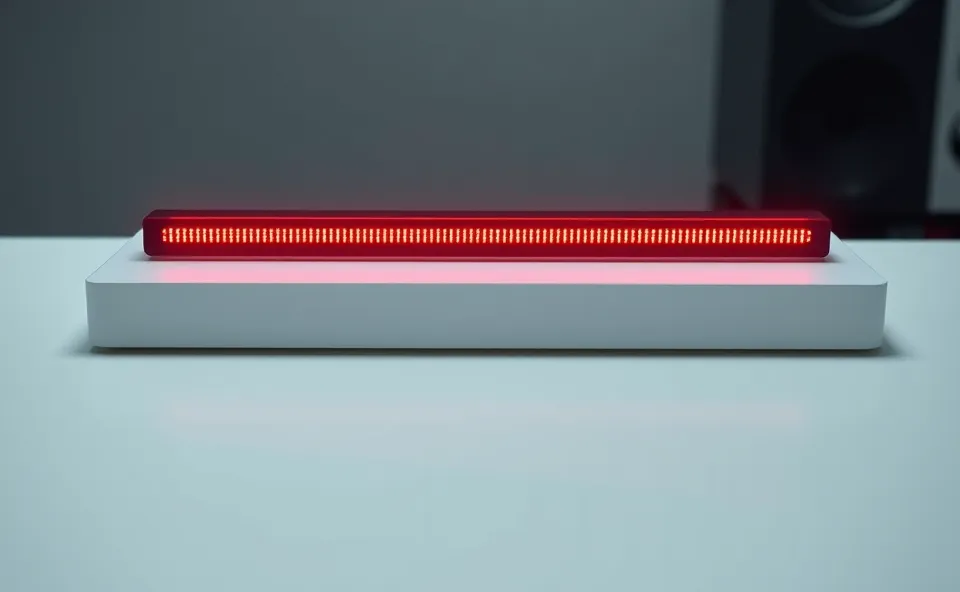
The Little Light That Could Bring Back Your Work Focus
Ever feel like your desk is a battleground for your attention? You’re trying to get deep work done, but then ping! An email, a Slack message, someone walks by asking a quick question. It’s exhausting, right? Well, Flipper Devices has a new little gadget that aims to help, and it’s called the Busy Bar. Think of it as a physical signal for your digital status, designed to cut through the noise and reclaim your concentration.
Why Everyone’s Suddenly Talking About This Desk Gadget
You might be wondering why this particular desk gadget is catching so much attention right now. In our increasingly connected world, the lines between work and personal life blur, and workplace distractions are at an all-time high. We’re constantly bombarded with notifications, and frankly, our attention span is feeling the strain. Tools that promise to help us regain control of our focus are incredibly appealing. The Busy Bar from Flipper Devices taps into this growing need for digital wellness and better workspace productivity. It’s a simple idea, but the execution and the underlying problem it solves are what make it trend.
From Cyberpunk Tool to Productivity Pal
To really get why the Busy Bar is interesting, you need a little background on Flipper Devices. They’re known for their Flipper Zero, a super cool, multi-tool gadget that’s a favorite among ethical hackers and tech enthusiasts for its ability to interact with various digital and radio frequencies. It’s a device that’s all about understanding and controlling your digital environment. The Busy Bar is kind of an extension of that philosophy, but for a more everyday problem: maintaining work focus in a busy office or a shared home workspace.
While the Flipper Zero is a powerful, technical device, the Busy Bar is designed for broader appeal. It’s a much simpler, more direct solution to a common modern dilemma. It takes the idea of signaling your availability and makes it visually obvious, moving beyond just a Slack status or an occupied sign. It’s about creating a clear, physical boundary for your mental space.
More Than Just a Pretty Light: Reclaiming Your Attention
So, what does this Busy Bar actually do, and how does it fit into your workspace? At its core, the Busy Bar is a visually distinct indicator that communicates your availability to others. You can set it to display different colors to signal whether you’re busy, available, or in a meeting. The magic lies in its simplicity and its integration. Imagine walking up to someone’s desk. Instead of guessing if now is a good time to ask a question, you see a solid red light. You know they’re in deep work mode and can wait or send a message. Conversely, a green light signals it’s probably okay to approach.
This isn’t just about making pretty colors on your desk; it’s about actively reducing office interruptions. When you’re wearing headphones, have a “do not disturb” sign, or are just trying to signal you’re heads-down, the Busy Bar amplifies that message. It leverages a visual cue that’s hard to miss, encouraging a more mindful approach to workplace interactions. This can significantly boost workspace productivity by minimizing context switching, which is a major drain on attention span and efficiency.
For businesses, this translates to potentially fewer disruptions and a more focused workforce. For individuals, it means more uninterrupted work sessions and less frustration from constant pings and pop-ins. It’s a small but powerful desk accessory that champions digital wellness by giving you a tangible way to manage your focus.
The integration is also pretty neat. It’s designed to work with various platforms you might already be using for collaboration. This means your calendar or your instant messaging status can automatically trigger the Busy Bar, so you don’t have to manually update it every time you switch tasks or join a call. This seamless integration is key to making it a practical tool rather than just another gadget to manage. It’s about making focus effortless.
What’s Next for Focus Tools?
Looking ahead, the success of the Busy Bar could pave the way for more innovative focus tools. We’re already seeing a trend towards gadgets that help manage our digital lives and improve our well-being. The Busy Bar is a concrete example of how technology can be used to address the growing problem of distraction. We might see more sophisticated versions that offer personalized focus modes, integrate with even more productivity apps, or provide insights into your distraction patterns. The underlying principle – using simple, intuitive signals to manage complex digital interactions – is likely to gain traction. Expect to see more clever desk accessories that help us navigate the modern work environment with greater ease and less mental fatigue.
Frequently Asked Questions About the Busy Bar
What is the primary function of the Flipper Devices Busy Bar?
The Flipper Devices Busy Bar primarily functions as a visual indicator to communicate your availability to colleagues, helping to minimize office interruptions and improve workspace productivity. It uses different colors to signal whether you are busy, available, or in a meeting, acting as a physical focus tool.
How does the Busy Bar help with workplace distractions?
The Busy Bar helps combat workplace distractions by providing a clear, non-verbal signal of your availability. When you are in deep work mode, the Busy Bar can be set to a “busy” color, signaling to others that it’s not a good time to interrupt, thereby protecting your attention span and work focus.
Can the Busy Bar integrate with my existing work tools?
Yes, the Flipper Devices Busy Bar is designed to integrate with popular work tools and platforms. This integration allows it to automatically change colors based on your calendar events or instant messaging status, making it a seamless addition to your desk accessory setup.
Is the Busy Bar a complicated desk gadget to set up and use?
No, the Busy Bar is intended to be a user-friendly desk gadget. While it offers smart integrations, its core functionality of signaling your status is straightforward. The aim is to make reclaiming your focus as simple as possible, contributing to digital wellness.
What makes the Busy Bar different from just setting my status online?
The Busy Bar offers a physical, visual cue that is often more impactful than an online status, which can be easily overlooked. It moves beyond the digital realm to create a more tangible representation of your availability, directly addressing the physical interruptions common in many offices and enhancing overall work focus.











