

A Google Pixel Watch 5 review: Is this the smartwatch for you?
The Latest From Google on Your Wrist
So, you’re curious about the Google Pixel Watch 5? Think of it as Google’s latest, smartest accessory for your life. It’s a sleek little disc that sits on your wrist, aiming to do a whole lot more than just tell time. It’s designed to be your pocket-sized assistant, fitness coach, and even a health monitor, all wrapped up in a stylish package. If you’ve ever felt like your phone does too much, or you just want quicker access to information and better insights into your well-being without pulling out your phone, this is what the Pixel Watch 5 is aiming to be for you. It’s built for people who like to stay connected, keep an eye on their health, and appreciate smart technology that makes daily life a bit smoother.
Living with the Pixel Watch 5: Day-to-Day Smarts
What does this actually mean for your everyday? Imagine this: you’re out for a run, and instead of fumbling for your phone to check your pace or skip a song, you just tap your wrist. The Pixel Watch 5 can track your workouts, count your steps, and even give you real-time feedback on your heart rate. If you travel frequently, imagine getting flight updates or boarding pass information right on your wrist, or checking train times without digging through your bag. For those managing a busy household, you could quickly set timers for cooking, send a quick text message to a family member, or even control your smart home devices – all with a simple voice command or a few taps. Plus, with its improved health tracking, you can monitor your sleep patterns, detect potential heart rhythm irregularities, and get a clearer picture of your overall fitness. It’s like having a helpful little sidekick for all those little moments throughout your day.
Who’s This Smartwatch For?
Best for: Die-hard Google fans and those deeply embedded in the Android ecosystem who want a seamless smartwatch experience that integrates tightly with their phones and other Google services. It’s also a strong contender for individuals prioritizing robust health and fitness tracking built around Google’s data and AI capabilities.
Good for: Anyone looking for a stylish smartwatch with excellent fitness tracking and useful AI features. If you appreciate having quick access to information, managing notifications efficiently, and getting insights into your health without constant phone interaction, the Pixel Watch 5 could be a great fit.
Skip if: You’re an iPhone user (it’s an Android-only device), or if you’re looking for a smartwatch with exceptionally long battery life that lasts multiple days without charging. Also, if you’re not interested in AI-driven features or detailed health metrics, you might find it’s more than you need.
How Does It Stack Up?
When we look at other smartwatches, the Google Pixel Watch 5 is going head-to-head with big names like the Apple Watch (for iPhone users) and Samsung’s Galaxy Watch series. The Apple Watch is the king of seamless integration for iPhone users, offering a very polished experience. Samsung’s Galaxy Watch often has a more robust set of features, sometimes including a physical rotating bezel for navigation, which some users prefer. The Pixel Watch 5’s strength lies in its deep integration with Google’s services and its focus on health, powered by Fitbit data. It also boasts some of the latest AI advancements, like the potential for offline Gemini, which could offer smarter, faster assistance without needing constant internet access. In terms of price, the Pixel Watch 5 typically sits in the premium smartwatch category, often priced similarly to its main competitors. While it offers a sophisticated Android-first experience, it might not have the sheer breadth of third-party app support found on some other platforms, though this is steadily improving.
Getting Started: Easy Does It
Setting up the Pixel Watch 5 is generally a straightforward process, especially if you’re already familiar with Android. You’ll need a compatible Android phone (Android 9.0 or newer) and the Google Pixel Watch app. The watch guides you through pairing, which usually involves a simple Bluetooth connection. You’ll sign in with your Google account, and then it’s a matter of choosing your preferred watch faces and customizing which apps and notifications appear on your wrist. For most everyday users, there’s not a steep learning curve. The touchscreen interface is intuitive, and navigating through menus feels natural. Voice commands are also a big part of the experience, making it easy to get things done without manual input. Most users report being up and running within 15-20 minutes.
The Good Stuff: What We Like
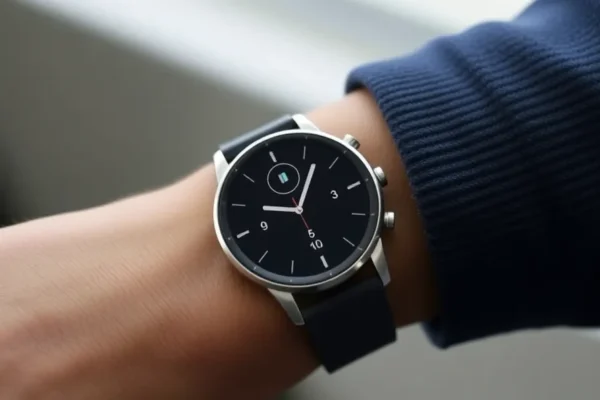
- Sleek and Comfortable Design: The Pixel Watch 5 boasts a minimalist, circular design that looks good on most wrists. It’s lightweight and comfortable enough for all-day wear, including sleeping.
- Excellent Health and Fitness Tracking: Leveraging Fitbit’s expertise, the watch provides comprehensive health metrics including heart rate, ECG, blood oxygen, sleep stages, and stress tracking. Users often praise the accuracy and actionable insights provided.
- Smart AI Integration: Features like Google Assistant are responsive, and the promise of enhanced AI capabilities, potentially with offline Gemini, hints at future improvements in on-device intelligence for faster and more private assistance.
- Smooth Android Integration: For Android users, notifications, calls, and app integration are seamless. It feels like a natural extension of your phone.
- Bright, Clear Display: The display is vibrant and easy to read even in bright sunlight, making it practical for outdoor activities.
The Not-So-Good: Where It Could Improve
- Battery Life: While improved from earlier models, the battery life can still be a concern for heavy users. Expect to charge it daily, especially with features like always-on display and GPS usage. Published reviews often note it might not last a full 24 hours for some.
- Limited Third-Party App Selection: While growing, the app store for Wear OS on the Pixel Watch 5 isn’t as extensive as some competitors like the Apple Watch. You might not find every niche app you’re looking for.
- No Physical Rotating Bezel: Unlike some competitors, the Pixel Watch 5 relies solely on the touchscreen and crown for navigation. Some users miss the tactile feedback of a rotating bezel for scrolling.
- No Charger in the Box (Potentially): Depending on the region and specific bundle, you may need to purchase a charging puck separately, which can be an unexpected cost.
Price, Value, and Your Wallet
The Google Pixel Watch 5 typically launches with a price tag in the mid-to-high premium smartwatch range, often starting around $350-$400 USD. Whether it’s worth it depends heavily on your needs. If you’re an Android user who values a stylish design, excellent health tracking backed by Fitbit, and the integration of Google’s AI smarts, then yes, it offers good value. However, if you’re on a tighter budget or need multi-day battery life, there are more affordable options available from brands like Amazfit or even older Fitbit models that might serve you better. There aren’t usually significant hidden costs, but consider if you’ll want extra watch bands, which can add to the overall expense. Compared to its direct competitors like the Samsung Galaxy Watch series, it’s often priced competitively.
The Final Verdict: Should You Buy It?
The Google Pixel Watch 5 is a compelling option for the right person. It’s a beautifully designed smartwatch that excels at health and fitness tracking and offers a glimpse into the future of AI on wearables. If you’re an Android user looking for a premium experience that deeply integrates with Google services, and you prioritize smart health insights and a sleek design, the Pixel Watch 5 is definitely worth considering. However, if you’re an iPhone user, need multiple days of battery life, or are looking for the absolute widest selection of apps, you might want to explore other options. For those who can live with daily charging and appreciate Google’s approach to wearable tech, this is a solid choice.
Got Questions? We’ve Got Answers
What’s the battery life like on the Pixel Watch 5?
The Pixel Watch 5 generally offers about a day of use, meaning you’ll likely need to charge it nightly. Heavy usage, like continuous GPS tracking, will drain it faster.
Is the Pixel Watch 5 good for fitness tracking?
Yes, it offers robust fitness tracking thanks to its integration with Fitbit, providing detailed metrics on workouts, heart rate, sleep, and more.
Can I use the Pixel Watch 5 with an iPhone?
No, the Google Pixel Watch 5 is designed exclusively for Android phones (running Android 9.0 or newer). It will not work with iPhones.
Does it have GPS?
Yes, the Pixel Watch 5 includes built-in GPS, which is essential for accurate tracking of outdoor activities like running or cycling without needing your phone.
How does the AI, like offline Gemini, work?
While the full capabilities are still rolling out, the goal of offline Gemini is to allow the watch to perform certain AI-powered tasks, like answering questions or controlling smart home devices, directly on the watch without needing to send data to the cloud, making it faster and more private.
What’s the screen like on the Pixel Watch 5?
The screen is a bright, clear AMOLED display that’s easy to see even in direct sunlight, and it supports an always-on display option for quick time checks.
Product prices and availability vary by region. Verify current pricing before purchase.











