Meet the Greenlight Family Hub: Your New Home Command Center?
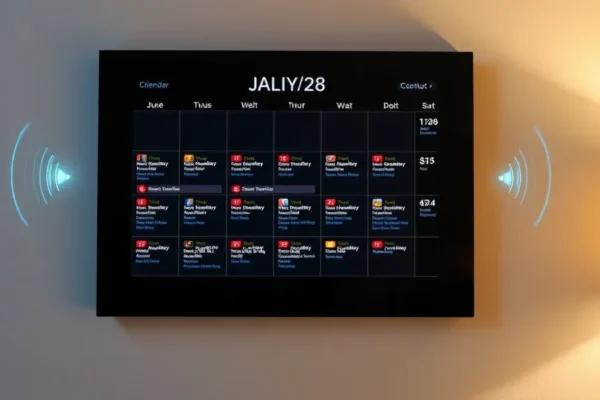
Imagine a single spot in your home where everyone can see what’s happening, from soccer practice to dinner plans, and where you can ask a quick question without pulling out your phone. That’s the idea behind the Greenlight Family Hub. It’s essentially a smart digital wall calendar that also has a voice assistant built in. Think of it as a super-powered family command center designed to cut down on missed appointments and kitchen counter clutter. If you’re juggling multiple schedules, trying to coordinate kids’ activities, or just want a more streamlined way to manage your household, this device aims to be your go-to solution. It’s particularly interesting as we look towards 2026 tech trends in smart home management.
How the Greenlight Family Hub Actually Works in Your Day
This digital wall calendar is designed to be the central point for all your family’s important information. You can sync it with your existing digital calendars (like Google Calendar or Outlook), so everyone sees the same schedule. But it’s more than just a display. The built-in voice assistant lets you add events hands-free. Just say, “Hey Greenlight, add ballet class for Sarah at 4 PM on Tuesday,” and it’s done. It can also answer questions like, “What time is Dad’s meeting tomorrow?” or “When is Mom’s birthday?”
Here are a few ways you might use it:
- Busy Household Manager: You’re prepping dinner and realize you forgot to schedule the dentist appointment. Instead of digging for your phone, you can ask the Greenlight Family Hub, “Hey Greenlight, schedule a dentist appointment for the kids next week.” It’ll tell you what times are open based on your synced calendars.
- Kids’ Helper: Your teenager needs to know when their pickup time is for a friend’s house. They can simply ask, “Hey Greenlight, when do I need to be home tonight?” and get an instant answer without interrupting your workflow.
- Traveler’s Peace of Mind: While you’re away on a business trip, your partner can easily add a new event or check the family’s schedule for the upcoming weekend using just their voice. It keeps everyone connected and informed.
Who This Smart Calendar is Really For
The Greenlight Family Hub is best suited for families who are heavily reliant on shared schedules and find themselves constantly juggling multiple calendars or relying on sticky notes.
- Best for: Large families with multiple kids, busy working parents who need to coordinate everyone’s comings and goings, and households where a central family information hub would be a game-changer. If you’re already invested in smart home technology and appreciate voice control, this fits right in.
- Good for: Couples who want to keep each other on track with appointments and social events, or individuals who like having a clear, visual overview of their week and enjoy the convenience of voice commands for basic tasks.
- Skip if: You prefer a minimalist approach to technology, don’t use digital calendars, or find voice assistants intrusive. If you’re looking for a highly customizable smart display with a vast app ecosystem, this might be too focused on just calendar and voice functions.
Comparing the Greenlight Family Hub to What Else is Out There
The Greenlight Family Hub occupies a niche that combines a dedicated digital wall calendar with voice control. Its main competitors aren’t always direct, but rather a mix of solutions:
- Smart Displays (like Amazon Echo Show or Google Nest Hub): These devices offer much more functionality beyond a calendar – streaming music, video calls, smart home control, and a wide range of apps. However, they often don’t have the same dedicated, always-on calendar display focus. The Greenlight Family Hub excels at being a central, visual family schedule.
- Dedicated Digital Photo Frames with Calendar Features: Some digital photo frames can display calendars, but they lack the voice assistant and robust syncing capabilities of the Greenlight.
- Traditional Whiteboards or Paper Calendars: The obvious analog alternative. These are simple and don’t require power or Wi-Fi, but they lack the dynamic updates, syncing, and voice control convenience.
The Greenlight Family Hub aims to be more purpose-built for family organization than a general smart display, and more interactive than a simple digital frame. Price-wise, it typically falls in the mid-range for smart home devices, often more expensive than a basic smart speaker but potentially less than a premium smart display, reflecting its specialized nature.
Getting Started with Your Greenlight Family Hub: Setup and Usability
Setting up the Greenlight Family Hub is generally straightforward. You’ll likely need to plug it in, connect it to your home Wi-Fi network, and then go through an app on your smartphone to link your existing digital calendars (Google Calendar, Outlook, etc.). The interface on the device itself is designed to be easy to navigate, with clear icons and a clean display.
The learning curve is minimal for basic functions like viewing the calendar and using voice commands for adding appointments. Adding more complex events or customizing display settings might take a little exploration, but it’s not overly technical. Most users report being able to get it up and running within 15-30 minutes. The voice recognition is designed to be responsive for common commands, but like all voice assistants, it can sometimes misinterpret requests or require a specific phrasing.
The Real-World Perks of Owning a Greenlight Family Hub
Here are some of the genuine advantages you can expect from this voice assistant calendar:
- Centralized Family Information: Everything is in one place, visible to everyone. No more “Who’s picking up who?” texts or lost notes. This is a big win for family organization.
- Hands-Free Scheduling: Being able to add events with just your voice while you’re cooking, holding a baby, or multitasking is incredibly convenient.
- Reduced Mental Load: For the primary household organizer, offloading the task of remembering and updating schedules to a digital device can be a huge relief.
- Clear Visual Overview: The digital display provides a clean, uncluttered view of your week or month, much easier to grasp at a glance than a phone screen.
- Smart Home Integration: It can feel like a natural extension of your smart home, working alongside other devices and providing an easy way to interact with your schedule.
Honest Downsides: What Might Frustrate You
No tech is perfect, and the Greenlight Family Hub has a few areas where it falls short for some users:
- Limited Functionality Beyond Calendar/Voice: If you’re expecting a full-fledged smart display with streaming video, advanced smart home control, or a wide app store, you’ll be disappointed. Its focus is very narrow.
- Voice Recognition Nuances: While generally good, voice assistants can still struggle with background noise, accents, or complex commands. This means occasional corrections or rephrasing might be necessary.
- Reliance on Connectivity: Like any smart device, it needs a stable Wi-Fi connection to sync calendars and respond to voice commands.
- Screen Size vs. Wall Placement: Depending on where you place it, the screen size might feel a bit small for detailed viewing from across a large room.
Price, Value, and If It’s Worth Your Money
The Greenlight Family Hub typically retails in the $150-$250 range, depending on sales and specific models. This positions it as a mid-tier smart home gadget.
- Is it worth it? For families who desperately need better organization and find themselves constantly battling calendar chaos, the convenience and central hub aspect can absolutely justify the cost. It’s about saving time and reducing stress.
- Hidden Costs: Usually, there are no ongoing subscription fees for the core functionality. You’ll need your own Wi-Fi and compatible digital calendar accounts.
- Value Proposition: It offers a specialized solution for family management that general smart displays don’t quite capture. If your primary pain point is coordinating schedules, its value is high. If you’re looking for a device to do many things, its value diminishes.
- Budget Alternatives: Cheaper digital photo frames with calendar modes exist, but without the voice assistant. Smart displays like the Amazon Echo Show 8 or Google Nest Hub offer more features for a similar price, but less of a dedicated calendar focus.
The Final Verdict: Should You Bring the Greenlight Family Hub Home?
The Greenlight Family Hub is a smart, focused device that can genuinely simplify family organization for the right user. It’s a practical solution for busy households aiming to get everyone on the same page without adding more screen time or complex tech.
You should buy this if: You’re tired of missed appointments, love the idea of a central family command center, and appreciate voice control for quick updates. If your main goal is streamlined family schedule management, this is a strong contender.
You should consider waiting or looking elsewhere if: You already have a robust digital organization system that works, you don’t want another screen on your wall, or you’re looking for a device with broader smart home capabilities and entertainment features.
Ultimately, the Greenlight Family Hub excels at its core mission: making family life a bit more organized and less chaotic through intelligent calendar technology and voice control. It’s a valuable addition to the smart home landscape for those who need it.
Frequently Asked Questions About the Greenlight Family Hub
Is the Greenlight Family Hub worth the price for family organization?
For families struggling with juggling multiple schedules and appointments, the Greenlight Family Hub can be a worthwhile investment. Its core function of providing a central, voice-controlled calendar significantly reduces the mental load and potential for missed events.
How does the voice assistant calendar feature work?
The voice assistant calendar allows you to add, query, and manage appointments using spoken commands. You can say things like, “Hey Greenlight, what’s on the schedule for tomorrow?” or “Add Dr. Smith’s appointment for next Tuesday at 10 AM.”
What are the main alternatives to the Greenlight Family Hub?
Key alternatives include general smart displays like the Amazon Echo Show or Google Nest Hub, which offer broader functionality but less dedicated calendar focus, and simpler digital calendars or whiteboards for those who prefer analog solutions.
Do I need a subscription to use the Greenlight Family Hub?
Generally, no. The core features of syncing with your existing digital calendars and using the voice assistant do not require a separate subscription. You will need your own Wi-Fi connection.
How easy is it to set up and use for non-technical people?
Setup is designed to be straightforward, involving connecting to Wi-Fi and linking existing calendar accounts via a companion app. Most users find it intuitive to use for daily tasks, though advanced customization might require some exploration.
What kind of calendar technology does it use?
It syncs with popular digital calendar services like Google Calendar and Outlook, acting as a smart display for that data. This means your existing calendar entries are pulled and presented visually on the digital wall calendar.
Product prices and availability vary by region. Verify current pricing before purchase.