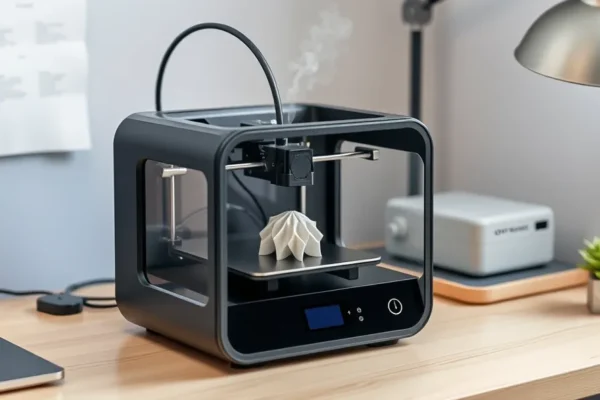
Meet the Formlabs Form Studio 1: Your New Desktop 3D Printer Pal?
Ever look at those cool 3D printed trinkets and think, “I wish I could make that”? Well, the world of 3D printing used to feel like a secret club for tech wizards. But companies like Formlabs are trying to change that. Their new Form Studio 1 is aiming to bring the magic of a desktop 3D printer into your home, even if your biggest tech achievement so far is mastering your smart TV remote.
What’s the big deal? Basically, this machine is designed to make creating your own physical objects easier and more accessible. Think of it like upgrading from a basic flip phone to a user-friendly smartphone. It aims to solve the problem of complicated setups and confusing software that often scares beginners away from 3D printing. So, if you’ve ever dabbled in DIY projects, admired custom figurines, or just have a brilliant idea you want to hold in your hand, this might be for you.
Formlabs is known for making high-quality professional 3D printers, but the Form Studio 1 is their big play for the everyday user. It’s not just for seasoned hobbyists; it’s designed with people who are new to 3D printing in mind. Why care now? Because the technology is getting more approachable and more affordable, opening up a world of creative possibilities for anyone with a bit of curiosity.
What Can You Actually Make with the Form Studio 1?
Let’s cut through the tech talk. This isn’t about printing complex circuit boards for a rocket ship (though advanced users might find ways to do that later). This is about making real, tangible things for your life. Imagine needing a specific replacement part for an old appliance that’s no longer made – the Form Studio 1 could potentially print you a new one.
Scenario 1: The Busy Household Organizer. Your kids’ Lego creations are taking over, and you need custom holders for their art supplies or a special piece to connect a broken toy. With this desktop 3D printer, you could design or download a simple bracket, print it out in a few hours, and have your clutter tamed. It’s like having a personal handyman on demand for small fixes and organizational hacks.
Scenario 2: The Creative Hobbyist. You’re into tabletop gaming and want unique dice towers or custom miniatures that nobody else has. Or maybe you’re a jewelry maker who needs a prototype for a new pendant design. The Form Studio 1 can bring those digital ideas into reality, letting you create one-of-a-kind items for your passion projects.
Scenario 3: The Gadget Enthusiast. You just got a new smart speaker, but the perfect wall mount doesn’t exist. Or you want a custom stand for your phone that’s exactly the right angle. You can design something simple using free software and print it to fit your devices perfectly. It’s about personalizing your tech and your space.
Who Should Seriously Consider This 3D Printer?
Best For: Beginners and hobbyists who are curious about 3D printing and want a user-friendly experience. If you’re someone who enjoys tinkering, making custom items, or fixing things around the house and wants a reliable, straightforward way to do it without a steep learning curve, the Form Studio 1 is designed with you in mind.
Good For: Educators looking for an accessible tool for STEM learning, small business owners who need to prototype product ideas quickly, or anyone who values having the ability to create custom solutions for everyday problems.
Skip If: You need to print extremely large objects regularly, require industrial-grade precision for highly technical applications (like precise dental or engineering parts), or are on a very tight budget. This isn’t the cheapest home 3D printer on the market, and its size limitations might be a dealbreaker for certain projects.
How Does the Form Studio 1 Stack Up?
Compared to other desktop 3D printers, especially those in the consumer 3D printing space, Formlabs usually commands a premium. Many affordable 3D printers are filament-based (like FDM printers), which can be fussier to set up and offer less detail. The Form Studio 1 uses a resin-based printing method (SLA), which generally produces smoother finishes and finer details, making it ideal for more intricate models.
Competitors in the resin printer space include brands like Anycubic, Elegoo, and Creality, which often offer lower price points. However, these can sometimes involve more manual work, messier post-processing, and potentially less polished software experiences. Formlabs’ advantage often lies in its integrated ecosystem – the printer, the software (Form Studio software), and the materials are designed to work seamlessly together. This can translate to a more reliable and less frustrating experience, though it often comes at a higher cost.
The Form Studio 1 aims to be more accessible than Formlabs’ professional machines, which can cost tens of thousands of dollars. It’s positioned as a bridge, offering that signature Formlabs quality without the overwhelming complexity or price tag of their high-end offerings, but it’s still likely to be more expensive than the entry-level resin printers.
Getting Started: Is It a Breeze or a Battle?
Formlabs has put a lot of effort into making the Form Studio 1 easy to set up. For beginners, this is crucial. The idea is that you should be able to unbox it, follow some clear instructions, and be ready to print your first object within an hour or two. It’s designed to be plug-and-play as much as a 3D printer can be.
You won’t need to be a soldering iron expert or understand complex calibration routines to get going. The software, Form Studio, is intended to be intuitive, guiding you through preparing your 3D models for printing. It should feel more like using a modern app than wrestling with outdated software.
However, resin 3D printing itself has a learning curve, regardless of the printer. You’ll need to get comfortable with handling resin safely (gloves and ventilation are a must), cleaning your prints, and curing them with UV light. While the Form Studio 1 simplifies the printing process, the surrounding workflow still requires attention to detail and adherence to safety protocols. It’s not a “set it and forget it” kind of device, but it aims to make the parts that are hands-on as manageable as possible.
The Real-World Wins You’ll Experience
1. Incredible Detail: This is where resin printers like the Form Studio 1 shine. For detailed figurines, intricate jewelry prototypes, or models with fine textures, the output is remarkably sharp and smooth. Users often report being impressed with the level of detail compared to other home 3D printer technologies. It works like a tiny, precise artist’s brush for your creations.
2. User-Friendly Workflow: Formlabs has a reputation for polished user experiences. The integration between their hardware, software, and materials is a significant advantage. This means fewer compatibility headaches and a smoother journey from digital file to physical object, which is a huge win for those new to 3D printing for beginners.
3. Reliable Performance: While any machine can have an off day, Formlabs printers are generally known for their reliability. This means fewer failed prints due to mechanical issues and a more consistent output, saving you frustration and wasted materials. This is a key benefit for a hobbyist 3D printer.
4. Clean and Compact Design: The Form Studio 1 is designed to look good on a desk, not like a clunky piece of industrial equipment. Its footprint is manageable for a home environment, and the enclosed nature of resin printing helps contain fumes and mess, making it a more pleasant home 3D printer option.
5. Wide Material Options: Formlabs offers various resin types tailored for different applications – from strong, durable resins to flexible or castable ones. This versatility means you can choose the right material for your specific project, enhancing the practical use of your 3D printer.
Honest Drawbacks to Keep in Mind
1. Resin Mess and Safety: Let’s be blunt, working with liquid resin is messy. Spills can happen, and the resin itself requires careful handling to avoid skin irritation. You’ll need a dedicated space with good ventilation and proper personal protective equipment (gloves, safety glasses). This isn’t like loading a pen; it’s a more involved process than typical consumer 3D printing.
2. Post-Processing Steps: After printing, your object needs to be washed in isopropyl alcohol to remove uncured resin and then cured under UV light to harden fully. This is an essential part of resin 3D printing, but it adds extra steps and requires additional equipment (a wash station and a curing station), which can increase the overall cost and complexity.
3. Build Volume Limitations: As a desktop 3D printer, the Form Studio 1 has a finite build area. You won’t be printing life-sized busts or large furniture pieces. If your projects often involve larger dimensions, you’ll either need to split them into smaller parts or consider a different type of printer.
4. Cost of Materials: Formlabs’ proprietary resins, while high-quality, can be more expensive than generic resins available for other brands. This is a recurring cost that can add up over time, especially if you’re printing frequently. It’s a factor to consider for an affordable 3D printer comparison.
Price, Value, and Is It Worth It?
The Form Studio 1 is positioned as an accessible entry into Formlabs’ ecosystem, but it’s not an impulse buy. Pricing for Formlabs products is generally in the mid-to-high range for consumer 3D printing. Expect to invest in the printer itself, which will likely be several hundred dollars, possibly upwards of $500-$1000 or more, depending on the exact configuration and current market pricing (as of early 2024).
Is it worth the price? For someone who values ease of use, high detail, and the reliability of a reputable brand, it could be. The value proposition is in the reduced frustration and higher quality output for hobbyist 3D printing. If you’re coming from budget resin printers that require constant tinkering, the Form Studio 1 might offer a smoother, more professional-feeling experience that justifies the premium.
Don’t forget the hidden costs. You’ll need to factor in the cost of resin, isopropyl alcohol for cleaning, gloves, and potentially a wash and cure station if they aren’t bundled. These can add another $100-$200 or more to your initial setup. For budget alternatives, you’ll find many resin 3D printers from brands like Elegoo or Anycubic in the $200-$400 range, but be prepared for a steeper learning curve and potentially less consistent results.
The Final Verdict: Should You Bring This 3D Printer Home?
The Formlabs Form Studio 1 is a compelling option for those looking to get into 3D printing with a focus on detail and a user-friendly experience. It’s an excellent example of an accessible 3D printing solution designed for everyday users and hobbyists. If you’re excited about creating detailed models, personalized items, and want a reliable desktop 3D printer that doesn’t require you to be a tech expert, this machine is definitely worth considering.
Who should buy this: Beginners who want a high-quality entry into resin 3D printing, hobbyists who prioritize detail and reliability, and anyone looking for a more polished and less frustrating experience than typically found with cheaper alternatives. It’s a great home 3D printer for creative projects.
Who should wait or look elsewhere: If your primary concern is the absolute lowest cost of entry, or if you need to print very large objects, you might find better options from other brands or different types of 3D printers. Also, if you’re not prepared for the safety and mess inherent in resin printing, this might not be the best fit.
Ultimately, the Form Studio 1 offers a fantastic blend of Formlabs’ professional-grade quality with a more approachable design for consumer 3D printing. It makes creating physical objects more achievable than ever before for the everyday user.
Your Form Studio 1 Questions Answered
Is the Form Studio 1 truly for beginners?
Yes, Formlabs designed it with beginners in mind. While all 3D printing has a learning curve, the Form Studio 1 aims to simplify the setup and printing process significantly compared to more complex machines.
How detailed can the prints be with this desktop 3D printer?
Resin printers like the Form Studio 1 are known for their high detail. You can expect very smooth surfaces and the ability to capture fine textures and intricate features, making it great for models and prototypes.
What are the running costs of using this 3D printer for beginners?
The main running costs are the proprietary Formlabs resins, which are priced higher than some generic options. You’ll also need isopropyl alcohol for cleaning and replacement consumables like build platform wipers or tanks over time.
Do I need special software to use the Form Studio 1?
Yes, Formlabs provides its own software, Form Studio, which is designed to work seamlessly with their printers. It’s what you’ll use to prepare your 3D models for printing.
Is it easy to switch between different types of resin materials?
Switching materials is generally straightforward. You’ll need to empty and clean the resin tank properly before filling it with a new resin type, but the printer is designed to handle different Formlabs resins.
Where can I buy this Formlabs 3D printer?
You can typically purchase Formlabs printers directly from the Formlabs website or through authorized resellers. Availability can vary by region.
Product prices and availability vary by region. Verify current pricing before purchase.