Meet the Google Fitbit Edge: Your New Health Companion
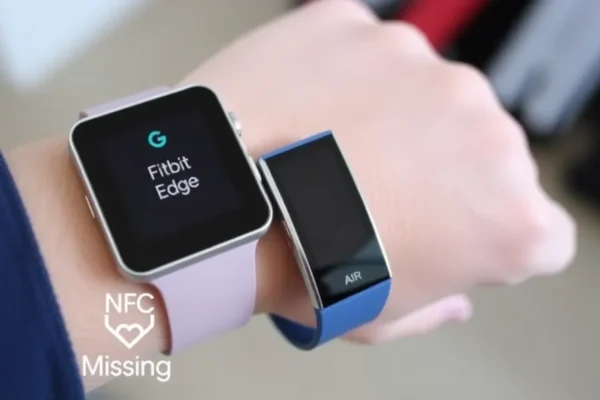
So, you’ve heard about the Google Fitbit Edge, huh? You’re probably wondering if this is the next big thing in wearable tech, especially if you’re already a fan of Fitbit or curious about what Google’s bringing to the table. Think of the Fitbit Edge as your personal health cheerleader and assistant, all wrapped up in a sleek device you wear on your wrist. It’s designed to help you understand your body better, from tracking your daily steps and sleep to keeping an eye on your heart rate and workouts. The big question on many minds is how it stacks up, especially when compared to something like the Fitbit Air. Let’s dive into what makes the Edge tick, and more importantly, what it means for you.
A Day in the Life with Your Fitbit Edge
What can this thing actually do for you on a daily basis? Well, imagine this: you wake up, and before you even get out of bed, your Fitbit Edge has already given you a rundown of your sleep quality – how much deep sleep you got, how restless you were. During your morning walk, it’s silently counting your steps, measuring your heart rate, and maybe even mapping your route if you’re using its GPS. Later, if you decide to hit the gym, you can select your workout, and the Edge will track your effort, calorie burn, and recovery. For those managing a busy household, it can be a subtle nudge to move more during your day, sending gentle reminders if you’ve been sitting too long. If you travel frequently, it’s a great tool to keep your activity levels consistent, even in unfamiliar places, and the smart notifications can keep you updated without constantly pulling out your phone.
Who Should Strap on a Fitbit Edge?
Best for: Anyone serious about tracking their fitness and health metrics but doesn’t necessarily need all the bells and whistles of a full-blown smartwatch. If you want a dedicated device to monitor your activity, sleep, and basic health stats with reliable accuracy, the Edge is a strong contender. It’s also great for those who appreciate a straightforward user experience and longer battery life than many high-end smartwatches offer.
Good for: People looking for a reliable fitness tracker that also offers some smart features like notifications and basic app integration. If you’re upgrading from an older or simpler Fitbit model and want a bit more capability without a huge learning curve, the Edge is worth considering.
Skip if: You absolutely need to make payments directly from your wrist, use a wide range of third-party apps on your wearable, or want the most advanced smartwatch features available. If NFC payments are a must-have for your daily routine, you’ll find the Edge lacking.
The Fitbit Edge vs. the Fitbit Air: What’s Missing?
When you look at the Google Fitbit Edge and its sibling, the Fitbit Air, there are some key differences. Both are designed to keep you moving and informed about your health. However, a significant omission on the Fitbit Edge is the lack of NFC (Near Field Communication). This is the technology that powers contactless payments. So, while the Edge is great at tracking your workouts and sleep, you can’t use it to tap and pay at a store or on public transport like you might be able to with other devices, including some smartwatches from other brands or potentially future Fitbit models. The Fitbit Air, on the other hand, often includes this feature, making it a more convenient option for quick transactions on the go. It’s a trade-off: the Edge focuses on core fitness tracking, while the Air might offer that extra layer of convenience.
Getting Started: Simple as Pie (Almost!)
Setting up the Google Fitbit Edge is generally a smooth process. You’ll typically need to download the Fitbit app on your smartphone, turn on your Edge, and follow the on-screen prompts. The app guides you through pairing the device with your phone and setting up your profile. For most users, this takes about 10-15 minutes. There’s not a steep learning curve; the app is designed to be intuitive, and navigating the watch itself is straightforward with its touch screen and a physical button. Think of it like setting up a new smartphone for the first time – it’s guided and manageable, even if you’re not the most tech-savvy person.
Real-World Perks You’ll Actually Notice
- Accurate Sleep Tracking: Users and reviews consistently praise Fitbit’s ability to provide detailed insights into sleep stages and quality. It feels like having a personal sleep coach.
- Reliable Activity Tracking: Whether it’s steps, heart rate, or specific workouts, the Edge is generally very accurate. It reliably counts your effort.
- Long Battery Life: Compared to many full-featured smartwatches, the Fitbit Edge often boasts several days of battery life on a single charge, meaning less time tethered to a charger.
- Intuitive App Interface: The accompanying Fitbit app is well-designed, making it easy to view your data, set goals, and understand your progress. It’s a clean dashboard for your health.
- Comfortable Design: The Edge is designed to be worn all day and night, and most users find it comfortable and lightweight, making it easy to forget it’s even there.
Where the Fitbit Edge Falls Short
- No NFC Payments: As mentioned, the biggest drawback for many is the absence of NFC. You’ll still need your wallet or phone for contactless purchases, which can be a significant inconvenience if you’re used to paying with your wrist.
- Limited Smartwatch Features: While it offers notifications, the Edge isn’t a smartwatch in the traditional sense. Don’t expect to download a wide variety of apps or have complex interactions beyond basic fitness and health tracking.
- No Built-in GPS on Some Models: While some versions of the Edge might include GPS, it’s crucial to check the specific model. If it relies on your phone for GPS, it’s less convenient for standalone outdoor activities.
- Notifications Can Be Basic: While you get alerts, interacting with them is usually limited. You can see them, but you can’t always reply or take action directly from the device.
Price, Value, and What You’re Paying For
The Google Fitbit Edge typically sits in the mid-range price bracket for advanced fitness trackers and basic smartwatches. You can expect to pay somewhere in the range of $150-$250, depending on current deals and specific models. For this price, you’re getting robust health and fitness tracking capabilities, a comfortable design, and good battery life. However, if NFC payments are a dealbreaker, you might be better off looking at a more expensive smartwatch from Fitbit or a competitor, where that feature is included. There are no significant hidden costs, though you might opt for premium accessories like different watch bands. If the Edge is priced too high, older Fitbit models or entry-level fitness trackers from other brands offer basic step and heart rate tracking for under $100, but with fewer advanced features.
The Final Word: Should You Buy the Fitbit Edge?
The Google Fitbit Edge is a solid choice if your priority is detailed and reliable fitness and health tracking. It excels at helping you understand your body’s activity, sleep patterns, and heart health. If you’re looking for a dependable wearable that’s easy to use and has good battery life, and you don’t mind leaving your wallet at home for quick purchases, then the Edge is a worthy consideration. It’s a step up from basic trackers and a more focused health device than a full-blown smartwatch.
However, if making payments directly from your wrist is an essential part of your daily convenience, or if you crave the extensive app ecosystem of a full smartwatch, you should definitely look elsewhere. For those who need NFC, exploring other Fitbit models (like the Fitbit Air where available) or smartwatches from brands like Apple, Samsung, or Garmin would be a better fit. Ultimately, the Fitbit Edge is for the dedicated tracker who values comprehensive health data and a user-friendly experience over cutting-edge smartwatch features like NFC payments.
Common Questions About the Fitbit Edge
Is the Google Fitbit Edge worth the price?
It depends on your needs. If you prioritize accurate fitness and sleep tracking, good battery life, and a straightforward interface, the price is generally fair. If NFC payments are a must, then it’s not worth the price for you.
How long does the Fitbit Edge battery last?
Battery life can vary depending on usage, but typically you can expect several days (often 5-7) of continuous use on a single charge, which is excellent for a wearable.
Can I make payments with the Fitbit Edge?
No, the Google Fitbit Edge does not have NFC capabilities, so you cannot make contactless payments directly from the device. This is a key difference compared to some other smartwatches and even other Fitbit models like the Fitbit Air.
Is the Fitbit Edge water-resistant?
Yes, the Fitbit Edge is typically water-resistant up to 50 meters, making it suitable for swimming and showering without worry.
What is the main difference between Fitbit Edge and Fitbit Air?
The most significant difference is the presence of NFC payments on the Fitbit Air (when available) and its absence on the Fitbit Edge. Both offer robust fitness tracking, but the Air adds payment convenience.
Do I need a smartphone to use the Fitbit Edge?
While you can use the Fitbit Edge on its own to track basic activities, you will need a smartphone with the Fitbit app installed to set up the device, view detailed data, receive notifications, and access advanced features.
Product prices and availability vary by region. Verify current pricing before purchase.