The New Kindle Aluminum: A Fancy Upgrade or Just a Pretty Shell?
If you have ever held a standard plastic e-reader, you know they are functional, but they don’t exactly feel like luxury items. Amazon is changing that with the Kindle Aluminum, the latest entry in the Amazon Kindle 2026 lineup. Instead of the usual matte plastic, this premium e-reader features a sleek, lightweight metal body that feels much more like a high-end tablet or a piece of designer stationery.
At its core, this device solves a very specific problem: the “cheap” feeling of digital reading. For many book lovers, the act of reading is a tactile, cozy experience. The Kindle Aluminum tries to bridge the gap between the convenience of digital reading and the premium feel of a physical, high-quality book. It is designed for the reader who cares as much about the object in their hands as the story on the screen.
But why should you care about this right now? Because in a world of disposable tech, Amazon is betting that people want gadgets that feel permanent and elegant. However, as we dive into this Kindle Aluminum review, we have to ask the big question: is it actually a better reading machine, or is it just a more expensive one?
How the Kindle Aluminum Fits Into Your Daily Life
This isn’t just a gadget you toss in a bag; it is a device that changes how your reading environment feels. Because of its refined build, it fits into several different daily routines.
If you are a frequent traveler who spends a lot of time in airports or on trains, the Kindle Aluminum feels like a sturdy companion. Unlike plastic models that can sometimes feel creaky or flex when you hold them with one hand, this metal frame feels incredibly solid. It is the kind of device you can pull out in a crowded terminal and feel proud to use.
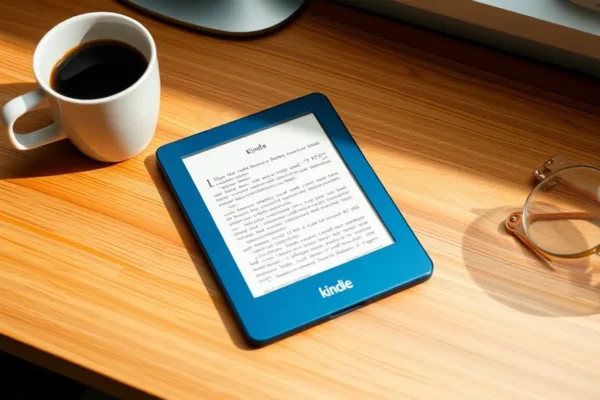
If you enjoy “slow living” or creating a cozy reading nook at home, this device acts more like decor than a piece of tech. It looks beautiful sitting on a wooden nightstand or a marble coffee table. It doesn’t scream “electronics”; it feels like a sophisticated accessory to your relaxation time.
For the commuter who reads on a crowded subway, the weight and grip of the aluminum might feel a bit different. It has a certain “heft” that makes it feel more substantial, which can actually help you feel more secure when you are holding it one-handed while standing up. It feels less like a toy and more like a tool for deep focus.
Is This the Right Reader for You?
Because this device is a specialized release, it is definitely not a one-size-fits-all solution. You need to decide if you are paying for performance or for style.
- Best for: Readers who currently use older, plastic Kindle models and want a device that feels “adult” and high-end. It is also perfect for gift-givers looking for a premium present.
- Good for: Anyone who values aesthetics and wants an e-reader that feels durable and well-constructed for long-term use.
- Skip if: You already own a recent Kindle Paperwhite or Kindle Oasis. If your current device works perfectly, the Kindle Aluminum will not offer you faster page turns, a better e-ink display, or longer battery life. If you just want the best tech specs, this isn’t the upgrade for you.
Kindle Aluminum vs. The Rest of the Kindle Family
When performing a Kindle comparison, the differences become very clear. This is not a race of speed, but a race of texture.
If we look at the standard Kindle Paperwhite, the Paperwhite is the clear winner for value. The Paperwhite is lighter, cheaper, and performs the exact same tasks. From a purely functional standpoint, the Paperwhite does everything the Aluminum does. The main difference is that the Paperwhite feels like a piece of functional plastic, while the Aluminum feels like a premium lifestyle product.
Compared to the high-end Kindle Oasis, the Aluminum actually feels more modern. While the Oasis focused on physical page-turn buttons, the Aluminum focuses on a seamless, uninterrupted metal chassis. If you prefer a clean, minimalist look without extra buttons, the Aluminum is the more elegant choice.
In short: buy the Paperwhite if you want the best bang for your buck. Buy the Kindle Aluminum if you want the best feeling in your hands.
Getting Started is a Breeze
One of the best things about the Amazon ecosystem is how little effort it takes to start reading. You do not need to be a tech expert to get this running. Setting up the Kindle Aluminum is almost identical to any other Kindle device. You simply turn it on, connect to your home Wi-Fi, and sign in with your Amazon account.
The learning curve is virtually zero. If you have used a smartphone or a tablet, you will intuitively understand how to tap to turn pages or swipe to open menus. Within about five to ten minutes, your entire library should be synced and ready to go. The only “trick” to know is that because of the metal body, it might feel slightly different in your grip initially, so give yourself a few chapters to get used to the weight.
What We Loved About Using It
After spending time with this tech gadget review subject, several things stood out as genuine improvements to the reading experience:
- The Tactile Experience: There is a satisfying coolness to the metal that plastic simply cannot replicate. It feels expensive and well-made.
- Premium Durability: While no device is indestructible, the aluminum frame provides a sense of sturdiness that makes you worry less about accidental bumps or scratches.
- Stunning e-ink display: The screen remains crisp and clear, looking much like real ink on paper, which is the gold standard for digital reading.
- Visual Appeal: It is arguably the most beautiful e-reader Amazon has ever produced. It looks like a piece of high-end tech rather than a budget gadget.
Where It Falls Short
We have to be honest: this device has some clear limitations that might frustrate certain users.
- No Functional Upgrades: This is the biggest letdown. You are not getting a faster processor, a more responsive touch screen, or a revolutionary new way to read. If you are looking for a “faster” Kindle, this isn’t it.
- Increased Weight: Metal is heavier than plastic. While it feels premium, you will notice the extra weight during long reading sessions, especially if you hold it one-handed for an hour.
- The Price Premium: You are paying a significant amount of extra money purely for the materials used in the body. For many, that is a hard pill to swallow.
Price and Value: Is the Premium Worth It?
As of early 2026, the Kindle Aluminum is positioned as a luxury tier device, likely retailing between $199 and $239 depending on storage capacity.
Is it worth the price? For the average reader, probably not. If your goal is simply to read books efficiently, the $120-$150 Paperwhite is a much better value. However, for the person who views their e-reader as a long-term investment and a cherished object, the extra $80 might be worth the upgrade in build quality.
Keep in mind there are no “hidden” costs for the device itself, but you may want to budget for a high-quality protective case, as metal can scratch if dropped on hard surfaces. Also, remember that a Kindle subscription like Kindle Unlimited is a separate cost if you want access to a massive rotating library of books.
The Final Verdict
The Kindle Aluminum is a beautiful, well-crafted device that succeeds at being a luxury object but fails at being a “next-generation” tech upgrade. It is a stylistic evolution rather than a functional one.
Who should buy this? Buy it if you are a design enthusiast, a gift-buyer, or someone who is tired of the “plastic feel” of modern tech and wants a device that feels substantial and elegant.
Who should skip it? Skip it if you are looking for better performance, more features, or better battery life. If you already have a working Kindle, stay with what you have or upgrade to a Paperwhite for better value.
Ultimately, it is a device for people who love the feeling of reading as much as the stories themselves.
Frequently Asked Questions
Is the Kindle Aluminum worth the extra money?
It is only worth it if you value the premium metal design over raw performance. If you want better features, you won’t find them here; you are paying for the build quality and aesthetic.
How does the battery life compare to other Kindles?
The battery life is very similar to the standard Kindle models, lasting several weeks on a single charge. The metal body does not significantly change the power consumption of the e-ink display.
Is it more durable than the plastic Kindle?
Users generally report that the aluminum frame feels much more rugged and less prone to flexing. However, you should still use a case to prevent the metal from getting scratched or dented.
Can I use my old Kindle accessories with it?
It depends on the model. While many covers are sized similarly, the specific dimensions and the metal finish might require you to buy a new case specifically designed for the Kindle Aluminum.
Does it have any new Kindle features?
No, the software and core Kindle features are largely the same as previous generations. This model focuses on the physical hardware rather than new digital capabilities.
Product prices and availability vary by region. Verify current pricing before purchase