A Brighter Future for Your Screen
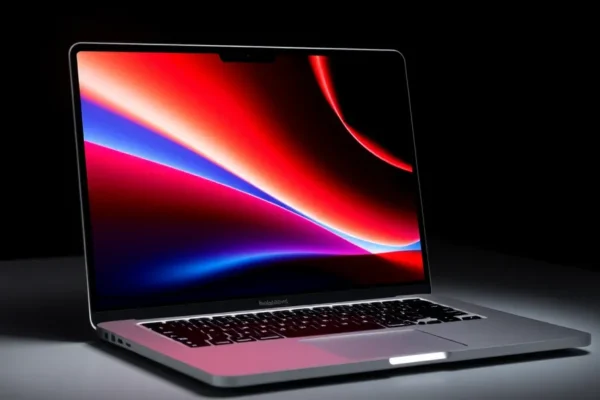
Apple’s latest MacBook Pro models are boasting a seriously impressive new screen. We’re talking about a 2000-nit OLED display, and that might sound like a mouthful of tech jargon. But what does it actually mean for you and your everyday digital life? Simply put, this new MacBook Pro screen is designed to be incredibly bright and show off colors like never before, making everything you do on your laptop look sharper, more vibrant, and more realistic. This isn’t just a minor upgrade; it’s a significant leap in laptop display technology, and it’s built for people who demand the best visual experience from their devices. If you spend a lot of time looking at your screen, whether for work or play, this upgrade is definitely worth paying attention to right now.
What This New Screen Actually Does for You
Imagine watching your favorite movies or TV shows, and the dark scenes are truly dark, with details you might have missed before. That’s thanks to the deep blacks that OLED technology is famous for. When you’re editing photos or videos, those colors will pop with incredible accuracy, making your creations look exactly as you intended.
Let’s get practical. If you travel frequently and often find yourself working outdoors or in brightly lit cafes, this 2000-nit brightness means your screen will still be easily visible, cutting down on eye strain and frustration. For creative professionals like photographers, video editors, or graphic designers, this high-end screen will be a game-changer. The precise color reproduction and stunning contrast allow for more accurate work, meaning fewer revisions and more professional-looking results. Even for everyday tasks like browsing the web or reading articles, the enhanced clarity and contrast make the experience more comfortable and enjoyable, like looking through a crystal-clear window.
Who This Super Screen is For
Best For: Creative professionals and serious media consumers. If your work involves visual accuracy (photo editing, video production, graphic design) or you’re a movie buff who wants the absolute best picture quality on your laptop, this is likely for you.
Good For: Anyone who values a premium visual experience. This includes students who want a top-tier display for research and entertainment, or professionals who spend hours a day on their computer and want to reduce eye fatigue and enjoy a more immersive experience.
Skip If: Your budget is tight, or your primary use for a laptop is basic tasks like email, web browsing, and word processing. While the screen is amazing, it comes at a premium, and you might not fully utilize its advanced capabilities. Also, if you’re not particularly bothered by current screen quality and don’t work with demanding visual content, the extra cost might not be justifiable.
How It Stacks Up Against Other Laptops
The main competition for this kind of display technology usually comes from other high-end laptops, often featuring mini-LED or other advanced LCD technologies. While those can get very bright, the OLED panel on the new MacBook Pro offers a significant advantage in terms of true blacks and contrast. This means when you see black on an OLED screen, it’s actually black, not a very dark gray. Other laptops might use local dimming to achieve deep blacks, but OLED achieves it pixel by pixel, which is a more natural and precise way to do it.
In terms of brightness, 2000 nits is exceptionally high for a laptop, significantly outshining many competitors that might peak around 500-1000 nits. This makes a big difference in bright environments. However, OLED technology can sometimes be more susceptible to burn-in over very long periods with static images, although modern advancements have greatly reduced this risk. For the price, you’re often paying a premium for this OLED panel compared to a high-quality LCD on another laptop. Whether that premium is worth it depends entirely on how much you value that absolute best-in-class visual quality.
Getting Started With Your New Display
The beauty of Apple’s MacBook Pro is that it’s designed for ease of use. There’s no complicated setup for the display itself. You turn on your new MacBook Pro, and the incredible OLED screen is ready to go right out of the box. It works like any other laptop screen, but everything looks noticeably better. There’s no learning curve for the display technology itself. You don’t need any special technical skills or knowledge. The operating system handles all the display settings, and you can adjust brightness and other basic options easily through the system preferences or control center. The setup time is just the time it takes to unbox and turn on your laptop. It’s designed to be intuitive and immediately impressive.
Real-World Perks You’ll Actually Enjoy
- Jaw-Dropping Visuals: Everything you do, from browsing photos to watching HDR content, looks stunning. The colors are incredibly vibrant, and the contrast is phenomenal, making images and videos truly leap off the screen.
- Working in Bright Light: Whether you’re at a sunny park cafe or under harsh office lights, the super-bright 2000-nit display means you won’t struggle to see your screen. It significantly reduces glare and makes outdoor work much more feasible.
- True Black for Deeper Immersion: For movies, gaming, or even just dark mode interfaces, the OLED’s ability to produce perfect blacks creates a more immersive and realistic viewing experience. Details in shadows are far more visible.
- Precise Color for Creatives: If you work with images or video, the color accuracy of this display is a major advantage. It means what you see on your screen is a faithful representation of your work, reducing guesswork.
- Reduced Eye Strain: While subjective, many users report that the combination of excellent brightness control, color accuracy, and deep blacks leads to a more comfortable viewing experience, even during long sessions.
Things That Might Frustrate You
- The Price Tag: This cutting-edge display technology is not cheap. You’re paying a significant premium for it, which can put the MacBook Pro out of reach for many.
- OLED Burn-In Concerns (Though Less of an Issue Now): While Apple and OLED manufacturers have made huge strides, there’s still a lingering concern for some users about potential burn-in if static images are displayed for extremely long periods consistently. The likelihood is low for typical users, but it’s a factor for some.
- Not All Content Benefits Equally: While the display is fantastic for HDR content and high-quality images, standard SDR content or older videos might not show the same dramatic improvement. The screen’s full potential is unlocked with optimized media.
- Power Consumption for Peak Brightness: While battery life on MacBook Pros is generally excellent, pushing the screen to its absolute peak brightness (2000 nits) for extended periods will naturally draw more power, potentially impacting battery duration in those specific scenarios.
What You’ll Be Paying for This Brilliance
As of late 2023/early 2024, MacBook Pro models featuring this advanced OLED display typically start in the mid-to-high $2000 range and can go up significantly depending on configuration. This is a high-end price point. The value proposition hinges heavily on your needs. For professionals who rely on their screen for their livelihood, the investment can absolutely be worth it, potentially saving time and improving the quality of their output. For casual users, it’s a luxurious feature that might be overkill. There are no significant hidden costs like mandatory subscriptions to unlock display features, but you might consider accessories like protective sleeves to keep this investment safe.
If this price is too steep, consider earlier MacBook Pro models with excellent Liquid Retina XDR displays, or look at high-end Windows laptops with Mini-LED screens, which offer a strong alternative for brightness and contrast at potentially lower price points.
The Final Word: Is This MacBook Pro Screen for You?
The 2000-nit OLED display on the new MacBook Pro is undeniably a technological marvel. It delivers breathtaking visual quality, making your digital world look more vibrant and detailed than ever before.
You should definitely consider this MacBook Pro if: You are a creative professional who needs the absolute best color accuracy and contrast for your work, or if you’re a media enthusiast who wants an unparalleled viewing experience for movies and shows on the go. If you frequently work in bright environments and need a screen that can keep up, this is also a top contender.
You might want to wait or look elsewhere if: You’re on a tighter budget, or your primary computer tasks don’t demand this level of visual fidelity. For general productivity, web browsing, and everyday use, many other excellent laptops will suffice without breaking the bank.
Ultimately, this display technology represents the pinnacle of current laptop screens. It’s a fantastic piece of tech innovation, but its value is directly tied to how much you’ll leverage its incredible capabilities.
Frequently Asked Questions About the MacBook Pro OLED Display
Is the 2000-nit OLED display on the MacBook Pro worth the extra cost?
For creative professionals and serious media consumers, the stunning visual quality and color accuracy can absolutely justify the premium price. For everyday users, it’s a luxury that might not be essential.
What’s the difference between OLED and other laptop screens?
OLED (Organic Light Emitting Diode) technology allows each pixel to light up independently. This means it can achieve perfect blacks (pixels are simply turned off) and incredible contrast, unlike traditional LCD screens which require a backlight and can’t display true black.
How long will this OLED screen last?
Modern OLED panels are quite durable. While concerns about burn-in (permanent ghosting of static images) exist, they are significantly reduced with Apple’s implementation and typical usage patterns. Longevity is generally expected to be many years for most users.
Can I use this MacBook Pro with an external monitor?
Yes, absolutely. The MacBook Pro supports external displays, and you can connect high-resolution monitors to complement its internal screen for an expanded workspace.
Does this display technology improve battery life?
While OLED is generally more power-efficient when displaying dark content, pushing the screen to its maximum 2000-nit brightness will consume more power. Overall battery life is still excellent due to Apple’s efficiency.
Where can I buy a MacBook Pro with this new display?
You can purchase MacBook Pro models featuring this display directly from Apple’s website, Apple retail stores, and authorized Apple resellers.
Product prices and availability vary by region. Verify current pricing before purchase.