The Wallhack M-001 Gaming Mouse A Solid Contender or Just a Flashy Gadget?
If you’re into PC gaming, you’ve probably seen your fair share of flashy mice. They promise lightning-fast reactions, ergonomic bliss, and a competitive edge. The Wallhack M-001 gaming mouse is one of those. It’s got some eye-catching features like a solid metal chassis and a unique tactile dongle that stands out. But does it actually perform as well as it looks, and more importantly, does it offer a genuinely fun gaming experience for everyday users? Let’s dive into this Wallhack M-001 review to see if it’s worth your desk space.
Putting the Wallhack M-001 to the Test in Real Life
So, what does this mouse actually do for you? For starters, it’s designed to give you a better grip and more precise control during gaming sessions. The tactile dongle, for example, is a small USB receiver that you plug into your computer. What’s neat about it is that it has a satisfying click or a little bit of resistance when you plug it in or remove it, which some users find adds a pleasant, tactile feedback. It makes connecting and disconnecting the mouse feel more deliberate and less like a gamble.
Imagine you’re in a fast-paced online shooter. Every millisecond counts. The Wallhack M-001 aims to help you land those crucial headshots with its responsive clicks and smooth movement. Or, picture yourself navigating a complex strategy game, where you’re constantly selecting units and issuing commands. The firm grip provided by the metal chassis can make those long hours at the computer feel a bit more comfortable, and the precise tracking means you won’t accidentally click the wrong building. Even for everyday tasks like editing a document or browsing the web, the weight and feel of a well-built mouse can make a difference in reducing fatigue.
Who’s This Mouse Really For?
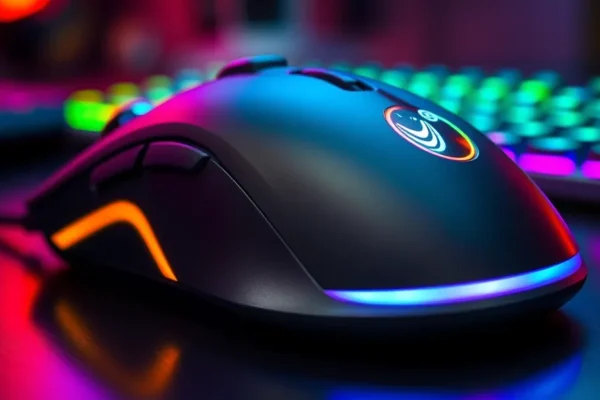
This gaming mouse is primarily designed for PC gamers who appreciate a premium feel and a bit of unique flair in their gaming peripherals. If you like your tech to feel substantial and well-crafted, the metal chassis will appeal to you. Gamers who value tactile feedback and a satisfying user experience will also find the M-001’s design choices intriguing.
It’s also a good option for those looking for a mouse that looks as good as it performs, sitting proudly on a desk with its sleek design.
Skip this mouse if: You prefer lightweight, minimalist peripherals, or if you’re on a super tight budget. If all you need is a basic mouse for web browsing and don’t engage in demanding gaming, the extra features might be overkill.
How Does the Wallhack M-001 Stack Up?
When we look at alternatives, the Wallhack M-001 sits in a space occupied by many gaming mice. Competitors often focus on ultra-light designs or extensive button customization. Brands like Logitech and Razer offer a wide range of gaming mice, from budget-friendly options to high-end professional-grade models.
Compared to many plastic-bodied gaming mice, the M-001’s metal chassis definitely gives it a more premium and durable feel. This is a significant differentiator. The tactile dongle is also a unique feature; most wireless mice use standard USB dongles that are often small and easy to lose, with no real tactile feedback. The M-001’s approach feels more robust. In terms of raw performance metrics (like DPI or polling rate), it generally performs within the expected range for a mid-tier gaming mouse, though it might not always reach the extreme numbers advertised by some ultra-high-end competitors.
Getting Started with Your Wallhack M-001
Setting up the Wallhack M-001 is thankfully straightforward. For wireless use, you simply plug the tactile dongle into a USB port on your computer. The mouse should connect automatically within seconds. If you want to use it with a cable, there’s usually a USB-C port on the mouse itself. For basic functionality, no software installation is required.
However, if you want to dive into mouse customization, like adjusting DPI settings, remapping buttons, or setting up custom lighting profiles, you’ll likely need to download specific software from Wallhack’s website. This software is generally user-friendly but does add a small learning curve. For most users, getting the mouse up and running for basic gaming takes mere minutes.
What We Liked: The Real-World Pros
- Solid Metal Chassis: This is a big win. The metal build makes the mouse feel incredibly sturdy and premium. It’s not flimsy plastic; it feels like it’s built to last and gives a satisfying heft when you use it. This can also contribute to a more stable feel during intense gaming sessions.
- Satisfying Tactile Dongle: It sounds minor, but the tactile feedback on the USB dongle is surprisingly enjoyable. It gives you a positive confirmation when you plug it in, making the wireless connection feel more secure and deliberate. It’s a small touch that elevates the user experience.
- Comfortable Grip for Extended Sessions: The weight and texture of the metal chassis, combined with the ergonomic shape, make the M-001 comfortable to hold for long gaming marathons. Your hand is less likely to fatigue compared to lighter, less substantial mice.
- Responsive Performance for Most Games: For its price point and feature set, the Wallhack M-001 offers reliable and responsive performance. It handles fast movements and quick clicks well in a variety of gaming genres, from first-person shooters to strategy games.
- Fun User Experience: Beyond just raw performance, the combination of the tactile dongle and the premium build quality contributes to a genuinely fun and engaging user experience. It feels good to use, which can make your gaming sessions more enjoyable.
Where the Wallhack M-001 Could Improve: Cons and Limitations
- Weight Can Be a Drawback for Some: While many appreciate the metal chassis for its solidity, it does make the mouse heavier than average. This might not be ideal for gamers who prefer ultra-light mice for rapid, flick-style movements, as it can feel a bit cumbersome initially.
- Software Might Not Be as Polished as Big Brands: While functional, Wallhack’s customization software may not be as intuitive or feature-rich as what you find from established brands like Logitech or Razer. Some users have reported minor bugs or a less-than-sleek interface.
- Battery Life Might Be Average: For a wireless gaming mouse, the battery life on the M-001 is reported by some users to be decent but not exceptional, especially with RGB lighting enabled. You might find yourself charging it more frequently than you’d ideally like if you play for many hours daily. Expect around 8-10 hours of continuous use with features like lighting on, which is on the lower end compared to some competitors.
- Durability of Finishes: While the metal chassis itself is robust, some user reviews suggest that the painted or coated finishes on the mouse might be prone to wear and tear over time, particularly on frequently touched areas.
Price, Value, and What You’re Getting
The Wallhack M-001 gaming mouse typically retails in the mid-range segment for gaming peripherals, often falling between $60 and $80. Considering the metal chassis and the unique tactile dongle, this price point offers a compelling value proposition. You’re getting a level of build quality that often comes with more expensive mice.
It’s certainly more affordable than many premium gaming mice that cost upwards of $100, and it offers a more substantial feel than budget gaming mice that are usually priced below $40 and are mostly plastic. There are no significant hidden costs, as it’s a plug-and-play device with optional free software for customization.
The Verdict: Should You Buy the Wallhack M-001?
The Wallhack M-001 review reveals a gaming mouse that punches above its weight in terms of build quality and user experience. If you prioritize a solid, premium feel and appreciate unique touches like a tactile dongle, this mouse is definitely worth considering. It offers a fun and comfortable gaming experience for extended sessions, and its performance is reliable for most gaming needs.
Get this mouse if:
- You love the feel of metal in your tech.
- You enjoy tactile feedback and a premium connection experience.
- You game for long periods and want a comfortable, substantial mouse.
- You’re looking for a good balance of build quality and price.
Look elsewhere if:
- You prefer extremely lightweight mice for fast twitch gameplay.
- You demand the absolute bleeding edge in sensor technology or battery life at any cost.
- You’re on a very tight budget and just need a basic mouse.
Ultimately, the Wallhack M-001 is a well-executed gaming peripheral that offers a satisfying user experience and solid performance. It’s a great choice for gamers who appreciate craftsmanship and a touch of unique design.
Common Questions About the Wallhack M-001
Is the Wallhack M-001 review accurate regarding its tactile dongle?
Yes, the tactile dongle is a notable feature. Users often report a satisfying click or resistance when plugging it in, which provides a positive confirmation that the connection is made. It adds a small but enjoyable layer to the wireless setup process.
What are the main advantages of the metal chassis on the Wallhack M-001?
The metal chassis provides a premium feel, exceptional durability, and a solid weight that can enhance grip stability during gaming. It makes the mouse feel much more robust and high-quality compared to typical plastic-bodied gaming peripherals.
How does the performance of the Wallhack M-001 compare to its specifications?
For most users and common gaming scenarios, the Wallhack M-001 performs as expected based on its specifications. While it might not always boast the absolute highest DPI figures of some ultra-high-end competitors, its sensor is accurate and responsive for everyday gaming and productivity tasks, offering a good balance between advertised specs and real-world usability.
Is the Wallhack M-001 a good value for the price?
Yes, for its price point, the Wallhack M-001 offers excellent value, particularly due to its metal chassis which is a premium feature. It provides a high-quality build and a fun user experience that often exceeds expectations for its cost, especially when compared to similarly priced plastic mice.
How long does the battery typically last on the Wallhack M-001?
Battery life can vary depending on usage, but users generally report it lasting around 8-10 hours of continuous heavy use, especially with RGB lighting enabled. For lighter use, it can extend longer, but it’s advisable to keep the charging cable handy if you’re a heavy gamer.
Can I customize the Wallhack M-001 settings?
Yes, Wallhack typically offers companion software that allows you to customize DPI settings, button assignments, and RGB lighting effects. While the software is functional, it’s worth checking user reviews to see if its interface and features meet your customization needs.
Product prices and availability vary by region. Verify current pricing before purchase